
How to Configure a Reverse Proxy on MarQi Cloud for Maximum Performance
May 20, 2026
Setting Up Redis on MarQi Cloud: The Performance Caching Guide
May 20, 2026
How to Automate MarQi Cloud Deployments With Terraform and Ansible
In today’s fast-paced technological landscape, organizations are continuously seeking ways to streamline their operational processes. One of the most effective strategies for achieving efficiency in cloud deployments is through automation. With tools like Terraform and Ansible, businesses can automate their deployments on MarQi Cloud, ensuring faster delivery, consistency, and scalability. In this article, we will explore how to leverage Terraform and Ansible to automate your cloud deployments effectively.
Terraform or Ansible: which one does what in a deployment?
Before diving into the automation process, it’s essential to understand what Terraform and Ansible are and how they complement each other.
What is Terraform?
Terraform is an open-source infrastructure as code (IaC) tool that allows you to define and provision data center infrastructure using a declarative configuration language. It enables you to manage infrastructure across various service providers, including MarQi Cloud. By using Terraform, you can create, manage, and update infrastructure resources efficiently.
What is Ansible?
Ansible is an open-source automation tool that automates software provisioning, configuration management, and application deployment. It uses a simple and human-readable language (YAML) to describe automation tasks. Ansible works by connecting to your nodes via SSH, allowing you to automate tasks without needing to install agents on target machines.
Why Use Terraform and Ansible Together?
Using Terraform and Ansible together provides a robust solution for automating cloud deployments. Terraform excels in provisioning infrastructure, while Ansible focuses on configuration management and application deployment. This combination allows for a seamless workflow where you can build, configure, and manage your cloud resources effectively.
Getting Started with Terraform and Ansible on MarQi Cloud
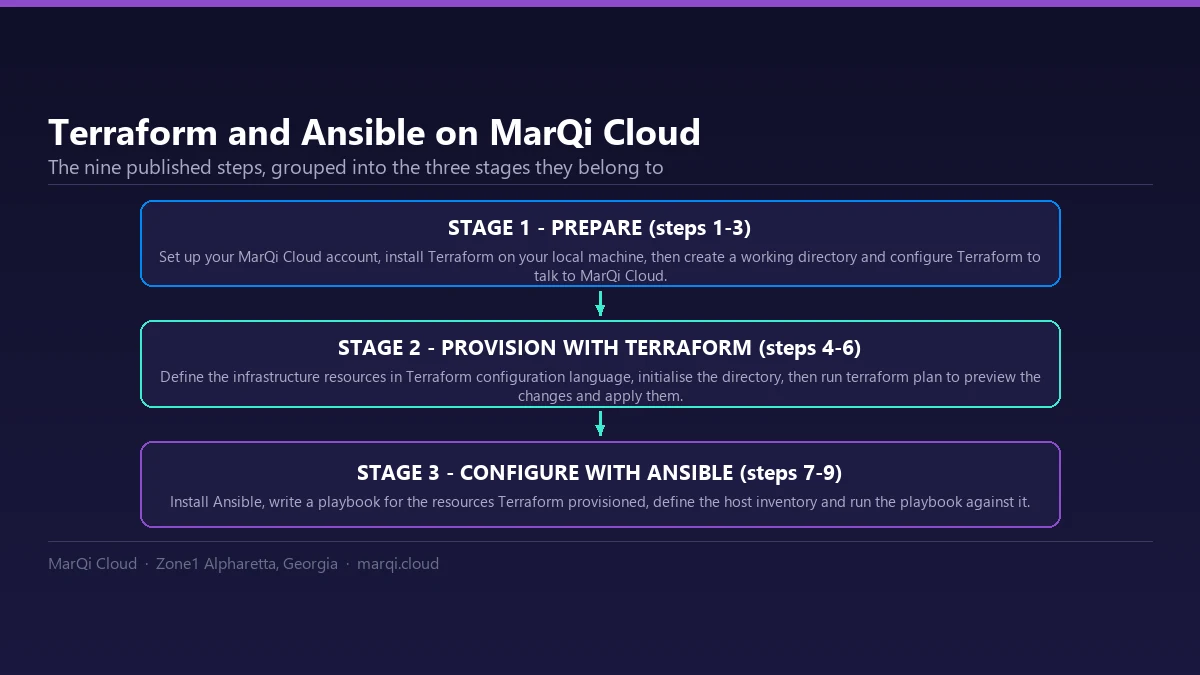
To automate your deployments on MarQi Cloud with Terraform and Ansible, follow these steps:
Step 1: Setting Up Your MarQi Cloud Account
Before you start, ensure that you have an active MarQi Cloud account. If you do not have one, you can sign up on the MarQi Cloud website. Once your account is set up, you will receive API credentials that will be used for authentication in Terraform.
Step 2: Installing Terraform
To get started with Terraform, you need to install it on your local machine. You can download the latest version of Terraform from the official Terraform website. Follow the installation instructions for your operating system.
Step 3: Configuring Terraform for MarQi Cloud
After installing Terraform, you need to configure it to work with MarQi Cloud. Create a new directory for your Terraform configuration files, and within that directory, create a file named main.tf. In this file, define your provider and authentication details:
provider "marqi" { access_key = "YOUR_ACCESS_KEY" secret_key = "YOUR_SECRET_KEY"}Step 4: Defining Infrastructure Resources
Using the Terraform configuration language, define the infrastructure resources you want to provision on MarQi Cloud. For example, you can define a virtual machine (VM) resource as follows:
resource "marqi_instance" "example" { name = "example-vm" image = "ubuntu-20.04" size = "medium" network_id = "your_network_id"}Make sure to replace the placeholders with your actual values.
Step 5: Initializing Terraform
Once you have defined your resources, navigate to your Terraform directory in the terminal and run the following command to initialize your Terraform working directory:
terraform init
Step 6: Planning and Applying Changes
Next, run the following command to see the changes Terraform will make to your infrastructure:
terraform plan
If everything looks good, apply the changes using:
terraform apply
Confirm the action when prompted, and Terraform will provision the defined resources on MarQi Cloud.
Step 7: Installing Ansible
Next, install Ansible on your local machine. You can do this via package managers such as apt for Ubuntu or brew for macOS, or you can download it directly from the Ansible website.
Step 8: Creating Ansible Playbooks
Once Ansible is installed, you can create a playbook to configure your provisioned resources. Create a new file named playbook.yml in your working directory. Here’s a simple example of a playbook that installs Nginx on your VM:
- hosts: all tasks: - name: Install Nginx apt: name: nginx state: present
Step 9: Running the Ansible Playbook
To execute your Ansible playbook, you need to define your inventory (a list of hosts) in a file (e.g., inventory.ini) as follows:
[marqi-vms] your_vm_ip_address
Now, run the Ansible playbook using the following command:
ansible-playbook -i inventory.ini playbook.yml
Best Practices for Automating Deployments
When automating deployments with Terraform and Ansible, consider the following best practices:
1. Version Control Your Infrastructure Code
Keep your Terraform and Ansible code in a version control system like Git. This practice ensures that you can track changes, collaborate with team members, and revert to previous versions if necessary.
2. Use Modules and Roles
In Terraform, utilize modules to encapsulate reusable code. In Ansible, make use of roles to organize playbooks and tasks. This modular approach simplifies management and enhances reusability.
3. Implement Environment Separation
Separate your different environments (development, staging, production) using workspaces in Terraform and inventory files in Ansible. This separation minimizes the risk of impacting production resources during development.
4. Follow Infrastructure as Code Principles
Document your code and ensure that it adheres to infrastructure as code principles. This approach promotes collaboration and understanding among team members.
Monitoring and Maintenance
After successfully deploying and configuring your resources, it’s crucial to monitor and maintain your infrastructure. Use monitoring tools to keep track of performance metrics and set up alerts for potential issues. Regularly review and update your Terraform and Ansible scripts to accommodate changes in your infrastructure requirements.
Conclusion
Automating deployments on MarQi Cloud with Terraform and Ansible can significantly enhance your operational efficiency. By following the steps outlined in this article, you can create a robust and scalable deployment process that minimizes manual intervention and maximizes productivity. Start automating your cloud deployments today and experience the benefits of a streamlined workflow.
Frequently Asked Questions (FAQ)
1. What is Terraform used for?
Terraform is used for infrastructure as code, enabling users to define and provision data center infrastructure through a declarative configuration language.
2. How does Ansible differ from Terraform?
Terraform focuses on provisioning infrastructure, while Ansible is used for configuration management and application deployment.
3. Can I use Terraform and Ansible separately?
Yes, both tools can be used independently, but they complement each other well when combined for automation.
4. Is it necessary to have programming skills to use Terraform and Ansible?
While basic knowledge of programming concepts can be helpful, both tools are designed to be user-friendly and do not require advanced coding skills.
5. What are the benefits of automating cloud deployments?
Automating cloud deployments improves efficiency, reduces the risk of human error, ensures consistency, and allows for quicker scaling.
6. Is MarQi Cloud compatible with other automation tools?
Yes, MarQi Cloud can integrate with various automation tools beyond Terraform and Ansible, such as Puppet and Chef.
7. How do I troubleshoot issues with Terraform or Ansible?
Check the logs and output messages provided by Terraform and Ansible for troubleshooting. Additionally, refer to the official documentation for guidance.
8. Can I automate the deployment of complex applications with these tools?
Yes, both Terraform and Ansible are capable of handling complex application deployments, making them suitable for a wide range of use cases.
9. Are there any costs associated with using Terraform and Ansible?
Both Terraform and Ansible are open-source tools and are free to use, although you may incur costs associated with the infrastructure you provision on MarQi Cloud.
10. How can I learn more about Terraform and Ansible?
There are numerous online resources, tutorials, and courses available that can help you learn more about Terraform and Ansible. Official documentation is also a valuable resource.




