
What cloud block storage actually costs
Block storage pricing is where cloud bills quietly go wrong. The headline figure is usually a per-gigabyte rate, but the number that determines your invoice is what sits around it: provisioned IOPS billed separately from capacity, throughput tiers you have to buy in blocks, snapshot storage charged at a different rate, and egress every time data leaves. Two providers quoting the same per-GB figure can differ by a multiple once those are added.
MarQi Cloud prices block storage on capacity, and we do not charge egress fees — moving your data out, between zones, or back to your own hardware costs nothing. Included IOPS are not metered separately, and snapshots and backups come with every plan rather than appearing as a line item later. Current figures are on our pricing page.
Cloud SAN storage pricing per GB and per TB
Block storage is USD 0.13 per GB per month, SSD-backed and billed on allocated capacity. There is no provisioned-IOPS tier to buy on top, snapshot storage is not charged at a premium rate, copies between zones are not billed as transfer, and there are no egress fees. Compute is priced separately at USD 2 per vCPU and USD 2 per GB of RAM per month, so a storage-heavy workload does not drag a compute bill behind it.
This is transparent published pricing: the same USD 0.13 per GB per month rate is listed on the public pricing page, with no egress fees and no vendor lock-in, so cloud block storage cost can be checked before any sales conversation.
| Allocated capacity | Per month |
|---|---|
| 100 GB | USD 13.00 |
| 500 GB | USD 65.00 |
| 1,000 GB (1 TB) | USD 130.00 |
| 5,000 GB (5 TB) | USD 650.00 |
| 10,000 GB (10 TB) | USD 1,300.00 |
These are arithmetic on the published per-GB rate and cover capacity only. Because IOPS, snapshots and egress are not separate lines, the figure above is the figure on the invoice — which is the part that usually differs from a public cloud quote. Full plan detail is on the pricing page.
Cloud SAN versus public cloud block storage
A traditional SAN gives you predictable latency and dedicated spindles, but you buy the array up front and you own the refresh cycle. Public cloud block storage gives you elasticity, but performance is a purchased tier and cost scales with every gigabyte you keep. Our storage sits between the two: a dedicated Ceph/PetaSAN cluster per zone, sized and operated by us, billed like cloud capacity rather than like a capital purchase.
That matters most for workloads with steady, high-IOPS demand — transactional databases, virtualisation estates, analytics working sets — where the public cloud model charges an elasticity premium you are not actually using.
How the cluster is built
Every zone runs its own storage cluster rather than sharing one across regions, so reads and writes stay local to the compute consuming them. Each volume is replicated three times across separate nodes. A failed disk is a background repair; a failed host is a re-replication event, not an outage. Because the cluster scales horizontally, adding capacity means adding nodes rather than migrating to a bigger array.
Replication protects against hardware failure. It does not protect against a dropped table or a bad migration — for that you need a point you can return to, which is what snapshots and backups provide. The two are complementary, and we include both.
Block, file, and object on one platform
Teams routinely end up with block storage from one provider, an object store from another, and a file share on a box nobody wants to touch. Consolidating them removes an entire category of integration work and makes capacity planning a single conversation. Ceph underpins all three access patterns, which is why we build on it.
High IOPS storage: performance you can verify
High IOPS is not a product tier here, it is a property of the cluster your volume sits on. IOPS and throughput figures are only meaningful against a stated block size, queue depth and read/write mix — a number quoted without them is marketing. We will benchmark against your actual workload profile before you commit, on the same compute platform and network fabric you would run on in production.
Where storage fits
Volumes attach to instances in your private VPC over the fabric described under network fabric, reachable through WireGuard and private networking. If part of your estate stays on your own arrays, both can serve one environment under our hybrid cloud model, or you can rack your own gear alongside ours via colocation. Zone locations are listed under our zones.
Sizing a storage tier, or comparing a quote against your current SAN? Talk to an engineer — we will do the arithmetic with you.
NVMe cloud storage: two transports, one cluster
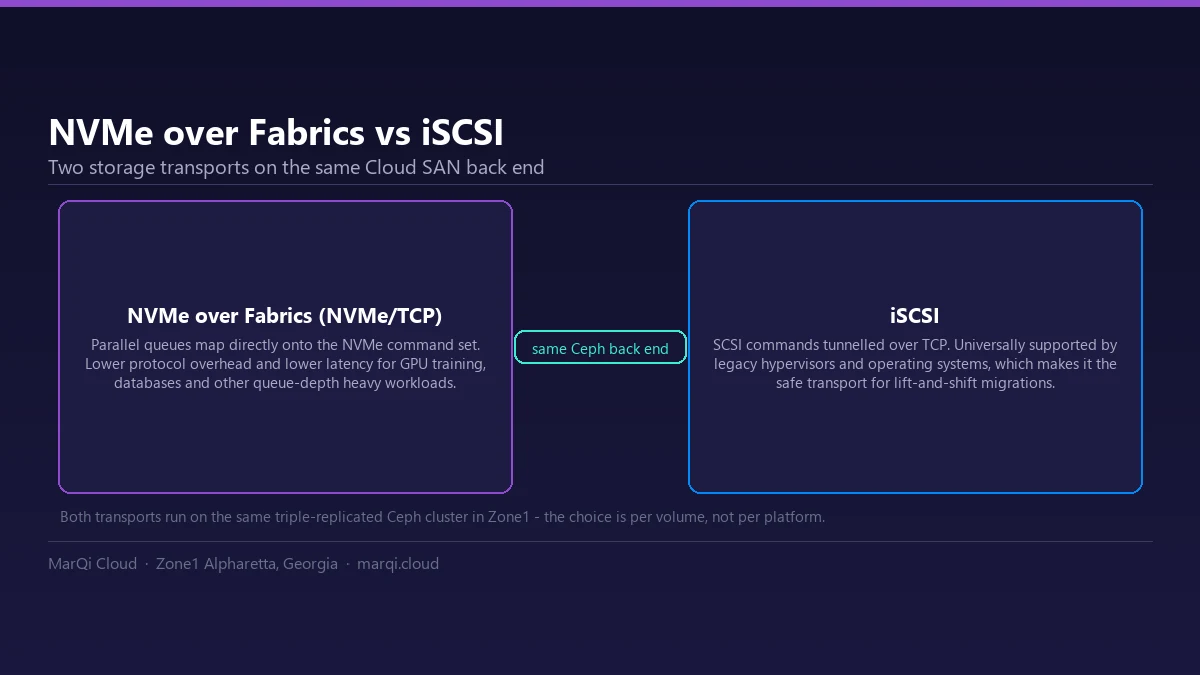
NVMe cloud storage is not a single product — it is a transport decision made per volume on the same back end. MarQi Cloud presents block storage over both NVMe over Fabrics (NVMe/TCP) and iSCSI. Which one belongs on a given volume is a measurable decision — see NVMe over TCP vs iSCSI on the same back end.
| Property | NVMe over Fabrics (NVMe/TCP) | iSCSI |
|---|---|---|
| Command path | Maps onto the NVMe command set with parallel queues | SCSI commands tunnelled over TCP |
| Best for | GPU training, databases, queue-depth heavy workloads | Lift-and-shift from legacy hypervisors and older guest OSes |
| Compatibility | Modern kernels and hypervisors | Universally supported |
| Back end | Same triple-replicated cluster | Same triple-replicated cluster |
Cloud SAN storage and triple replication
Every block write is committed to three separate OSDs on three separate nodes before it is acknowledged. Losing a node loses no data, and the volume stays online while the cluster rebuilds. That is what makes it a cloud SAN rather than a disk attached to a hypervisor.
Object storage on the same Ceph foundation
Alongside block storage, MarQi Cloud provides Ceph-based object storage for backups, media and dataset archives — on the same cluster, with the same no-egress-fee billing when you read the data back out.
Service levels and credits
Availability for block storage is committed per service, not as a single blended figure across an account. Compute, block storage, network and connectivity, VPN and load balancing, and colocation power and space are each covered separately. Availability is calculated per calendar month as the percentage of minutes during which the service was available, and an unavailability period starts at the earlier of our monitoring detecting it or you opening a ticket.
When we miss a commitment the remedy is a tiered service credit against the affected service. The specific commitment that applies to your services is stated in your order or agreement with us; if you are evaluating us and need the figures before you sign, ask an engineer and we will put them in writing. The full framework — covered services, how availability is measured, exclusions and the credit mechanism — is published in our Service Level Agreement.
Block storage pricing on MarQi Cloud
Block storage is billed on a single line: $0.13 per GB per month. There is no separate IOPS tier to buy and no charge for data leaving the platform, so the capacity figure is the whole storage bill. The full price list is on the pricing page.
| Line item | What MarQi Cloud charges |
|---|---|
| Block storage capacity | $0.13 per GB per month |
| IOPS and throughput tier | Not sold separately — performance comes from NVMe media, not a paid tier |
| Snapshots and backups | Included in every plan |
| Triple replication | Included — every block write is committed to three separate OSDs |
| Data egress | $0 |
| vCPU | $2 per vCPU per month |
| RAM | $2 per GB per month |
The comparison against metered public-cloud block storage, with the working, is in Cloud SAN vs public cloud block storage.
Frequently asked questions
How is cloud block storage priced at MarQi Cloud?
Block storage is billed on capacity. Provisioned IOPS are not sold as a separate tier, snapshot storage is not charged at a premium rate, and there are no egress fees on data leaving or moving between zones.
How does a cloud SAN differ from public cloud block storage?
A traditional SAN gives predictable latency and dedicated capacity but requires a capital purchase and a refresh cycle. Public cloud block storage is elastic but charges a premium for performance tiers. MarQi Cloud runs a dedicated Ceph/PetaSAN cluster per zone, operated by us and billed like cloud capacity.
How many copies of my data are kept?
Every volume is replicated three times across separate nodes. Replication protects against disk and host failure; snapshots and backups, which are included in every plan, protect against deletion and corruption.
Can block, file and object workloads run on one platform?
Yes. Ceph underpins block, file and object access patterns, so the three can be consolidated on a single platform instead of split across separate providers. That is a property of Ceph itself rather than a MarQi feature: the Ceph documentation describes RBD for block devices, CephFS for a POSIX filesystem and RGW for S3-compatible object storage as three interfaces onto the same cluster.
How much does block storage cost per GB?
Block storage at MarQi Cloud is USD 0.13 per GB per month, SSD-backed and billed on allocated capacity. Provisioned IOPS are not sold as a separate tier, snapshot storage is not charged at a premium rate, and there are no egress fees on data leaving the platform or moving between zones.
What does 1 TB of cloud block storage cost per month?
At the published rate of USD 0.13 per GB per month, 1,000 GB costs USD 130.00 per month for capacity. There is no separate IOPS, snapshot or egress line to add on top, so that figure is what appears on the invoice.
Is this a scalable storage solution as data grows?
Yes. The Cloud SAN is built as scalable storage: each zone runs a dedicated Ceph/PetaSAN cluster that scales horizontally into the exabytes by adding storage nodes, and every volume keeps triple replication across separate nodes as it grows. Growth does not change the economics either - capacity stays at USD 0.13 per GB per month, roughly USD 130 per terabyte, with no provisioned-IOPS tier or egress fees added as you expand.
How is storage I/O billed during multi-node training runs?
It is not billed separately. Block storage is charged on allocated capacity at USD 0.13 per GB per month, and there is no provisioned-IOPS tier to buy on top, so the read and write traffic a checkpoint cycle generates — including several nodes writing at once — does not add a metered line to the invoice. Copies between zones are not billed as transfer and there are no egress fees, so reading checkpoints back out costs nothing either. What you size for is capacity, not operations.
How should I size block storage volumes and queue depth for a high-transaction database?
Size the volume for capacity, because capacity is what is billed, and then let the workload use the IOPS it needs: included IOPS are not metered separately. On the queue side the governing rule is that a storage device only delivers its full throughput when enough requests are outstanding at once, so a database limited to a handful of in-flight I/Os will leave a fast cluster idle. Raise the engine’s I/O concurrency until throughput stops improving, then stop. The underlying cluster is Ceph/PetaSAN and every piece of data is stored on three different nodes.
Can IOPS scale without the bill changing shape?
The pricing model does not change as I/O grows. Block storage is priced on allocated capacity at USD 0.13 per GB per month: there is no provisioned-IOPS tier, no throughput block to buy, no premium rate for snapshot storage and no egress fee. The cluster scales horizontally by adding storage nodes, so the variable that moves on your invoice is gigabytes, not operations — which is what makes the cost predictable at enterprise scale.
Does scaling IOPS make the storage bill go up?
No. IOPS are not sold as a separate provisioned tier on MarQi Cloud, so there is no performance line to add to the invoice as a workload gets busier. Block storage is billed on capacity at USD 0.13 per GB per month, triple replicated, and snapshot storage is included in that volume capacity rather than priced at a premium. Performance comes from the NVMe tier the volumes sit on, not from a paid add-on, and copies between zones are not charged as data transfer. The practical effect is that the storage number you calculate at the start of the month is the one you are billed for, whether the volume served a quiet week or a saturated one.
Related engineering articles
- Why Enterprise Cloud Architecture Should Be Designed for the Next Decade
- The Complete Guide to Cloud Infrastructure Decommissioning & Data Sanitization
- How Cloud Provider Transparency in Incident Communication Builds Trust
- Why Workload-Specific Cloud Instance Selection Outperforms General-Purpose Options
- The Complete Guide to Building a Multi-Year Cloud Infrastructure Roadmap for Enterprise Growth
- How Cloud Infrastructure Drives Digital Transformation in Traditional Industries
- Why MarQi Cloud’s Engineering Team Prioritizes Customer Outcomes
- How Cloud Infrastructure Supports Bring Your Own Device Policies Securely
Browse the full archive: Cloud Storage & Data (20) · Cloud Infrastructure (384)