
KVM, and why it matters
Our hypervisor is KVM — the virtualisation layer built into the Linux kernel, the same technology most large clouds run underneath their own branding. Running it without a proprietary wrapper has a practical consequence: a machine image that runs here runs on any KVM host, so moving in or out is a copy operation rather than a conversion project.
The hosts
Compute hosts are multi-core with terabytes of RAM and multiple network paths into redundant switching, so no single link failure takes an instance offline. We run Ubuntu LTS across hosts, and UEFI with TPM support means modern Windows Server guests install and run properly rather than in a legacy compatibility mode. Mixed estates do not need a second provider.
Virtual machines, not shared containers
An instance is a real virtual machine with its own kernel, not a container sharing one. That matters for workloads with kernel-level requirements, for security isolation between tenants, and for anything you intend to lift from physical hardware without rewriting it first.
Storage and network attached to compute
Instances attach to block volumes from a per-zone Ceph/PetaSAN cluster with triple replication — described under storage architecture — with the volume local to the zone the instance runs in, so the read path is short. Networking is private by default: your own VPC, reached over WireGuard rather than an exposed public port, described under networking and VPN. The fabric underneath is at network fabric.
Launching and protecting instances
Prepared images and custom golden images are covered under templates and images, and every plan includes snapshots and backups so a bad migration is a rollback rather than a rebuild. The NOC watches host health continuously — see status and monitoring.
When you need something else
Accelerated workloads run on dedicated cards with PCIe passthrough — see GPUs for AI/ML. Hardware you already own can sit alongside rented capacity in one environment via colocation and hybrid cloud. Plans and inclusions are on pricing; a first deployment is walked through under getting started.
Bare metal servers in Atlanta, Georgia
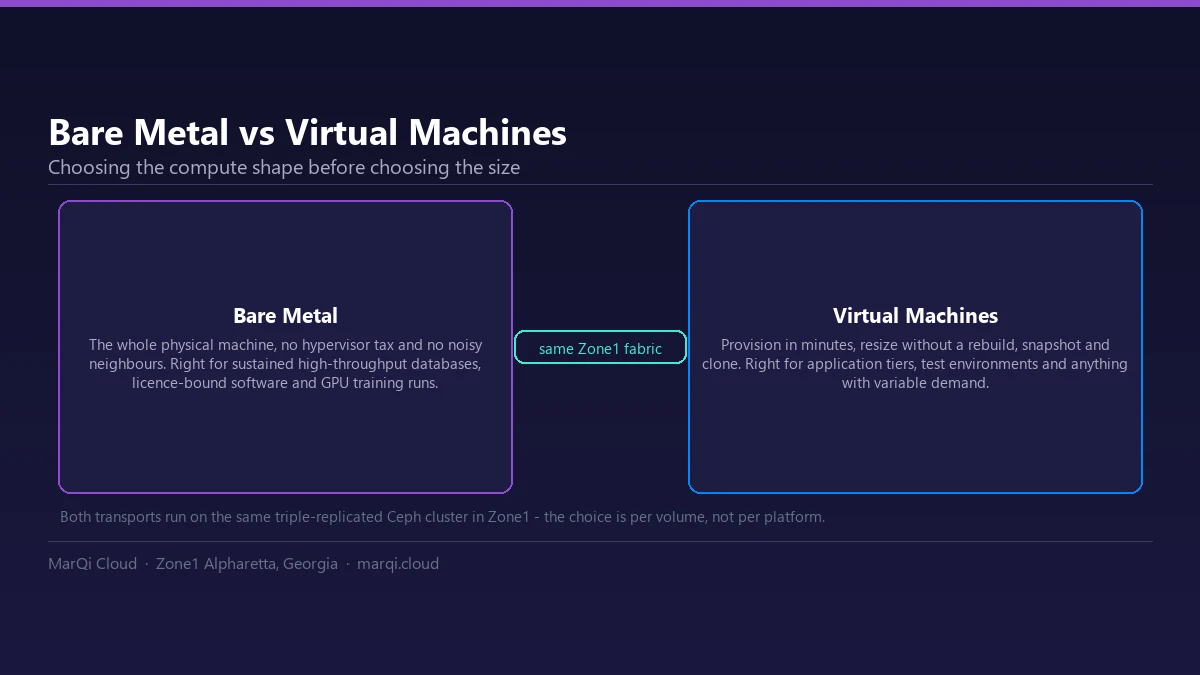
Some workloads should not share a hypervisor: latency-sensitive databases, licence-bound software, and GPU training that needs the whole device. For those, bare metal servers in Zone1 — Alpharetta, GA, in the Atlanta metro — give you the full machine, in a facility MarQi Cloud operates.
| Property | Bare metal server | KVM virtual machine |
|---|---|---|
| Hypervisor layer | None | KVM, managed by Apache CloudStack |
| Neighbours | None — the machine is yours | Dedicated vCPU allocation, not oversubscribed slices |
| Scaling | Add machines | Resize the pool from the portal |
| Best for | Databases, licence-bound and GPU workloads | Everything that benefits from elasticity |
Dedicated vCPU cloud: what “dedicated” has to mean
A dedicated vCPU is only dedicated if nobody else is scheduled onto it. MarQi Cloud allocates vCPU and RAM from a pool you reserve at $2 per vCPU and $2 per GB of RAM per month — you scale that pool up or down from the client portal, and what you reserve is what runs your workload.
Service levels and credits
Availability for the compute platform is committed per service, not as a single blended figure across an account. Compute, block storage, network and connectivity, VPN and load balancing, and colocation power and space are each covered separately. Availability is calculated per calendar month as the percentage of minutes during which the service was available, and an unavailability period starts at the earlier of our monitoring detecting it or you opening a ticket.
When we miss a commitment the remedy is a tiered service credit against the affected service. The specific commitment that applies to your services is stated in your order or agreement with us; if you are evaluating us and need the figures before you sign, ask an engineer and we will put them in writing. The full framework — covered services, how availability is measured, exclusions and the credit mechanism — is published in our Service Level Agreement.
Frequently asked questions
What hypervisor does MarQi Cloud use?
MarQi Cloud runs KVM, the virtualisation layer built into the Linux kernel, orchestrated with Apache CloudStack and other open source tooling. There is no proprietary hypervisor licence in the stack, and a KVM image you run here uses standard formats rather than a vendor-specific one. Both halves of that are upstream open source projects with their own documentation: KVM in the Linux kernel and Apache CloudStack.
Are these virtual machines or shared containers?
They are full virtual machines. Each instance gets its own kernel and its own allocated CPU, memory and disk on a multi-core, memory-rich host — not a slice of a shared container runtime. Hosts are multi-NIC connected into redundant switching fabrics.
Can I run Windows Server as well as Linux?
Yes. The compute hosts provide UEFI and TPM support, so modern Windows Server guests install and run normally rather than in a legacy compatibility mode. Ubuntu LTS is the default recommended image, and pre-built templates exist for common Linux distributions and Windows versions.
Can I mix rented virtual machines with hardware I own?
Yes. Hardware you colocate in the same zone joins the same network fabric as your virtual machines, so a single VPC can contain both. That is the basis of the hybrid cloud setup, and there are no egress fees on traffic between them.
Is self-service provisioning available on the compute platform?
Yes. Compute is sold as a resource pool that you allocate to your VMs yourself: add machines, resize the pool and scale vCPU and RAM up or down at any time directly from the client portal. Pricing does not change with the action - USD 2 per vCPU and USD 2 per GB of RAM per month, with block storage at USD 0.13 per GB per month and no egress fees.
Can I run memory-optimized instances on the compute platform?
Yes. There are no fixed instance families here - vCPU and RAM are allocated independently from the pool you reserve, so a memory-optimized instance is simply a VM shaped with a high RAM-to-vCPU ratio for databases and caches, and a compute-optimized instance is the reverse. At USD 2 per vCPU and USD 2 per GB of RAM per month the price follows whatever ratio you choose, and you can resize the pool from the client portal as the workload changes.
Related engineering articles
- Why Bare Metal Cloud Hosting Ensures Consistent Performance for Latency-Sensitive Applications
- Ultimate Guide to Optimize Cloud VPS Performance for High-Traffic Applications
- Why Bare Metal Private Cloud Delivers Maximum Performance for Compute-Intensive Workloads
- The Complete Guide to Migrating from Bare Metal to Virtualized Cloud Infrastructure
- The Complete Guide to Cloud Compute Density and Performance Benchmarking
- The Complete Guide to Cloud Compute Resource Planning for Business Workloads
- What Is Bare Metal Cloud and Why It Destroys Shared Hosting for Performance
- Why AI Needs Bare Metal Performance: Unlocking the Potential of Artificial Intelligence
Browse the full archive: Bare Metal & Compute (57)