How to Build a DevOps Pipeline on MarQi Cloud From Scratch
June 10, 2026
Object Storage vs Block Storage vs File Storage: Which One Does Your Cloud Workload Actually Need?
June 11, 2026
How to Deploy Kubernetes on MarQi Cloud VPS the Right Way
Kubernetes has become the de facto standard for container orchestration, allowing organizations to manage their containerized applications with efficiency and reliability. With MarQi Cloud’s enterprise-grade cloud infrastructure, deploying Kubernetes on a Virtual Private Server (VPS) is not only feasible but also optimized for performance, security, and scalability. In this guide, we will walk you through the steps to deploy Kubernetes on MarQi Cloud VPS the right way, ensuring a smooth and successful installation.
Understanding Kubernetes and Its Benefits
Kubernetes, often abbreviated as K8s, is an open-source platform designed to automate the deployment, scaling, and management of containerized applications. Some of the core benefits of using Kubernetes include:
- Scalability: Kubernetes can scale applications seamlessly, allowing you to adjust resources based on demand.
- Self-Healing: Kubernetes automatically replaces and reschedules containers that fail, ensuring high availability.
- Load Balancing: It distributes traffic evenly across containers, optimizing resource usage.
- Declarative Configuration: Kubernetes uses a declarative approach for configuration management, making it easier to maintain consistency across environments.
Why Choose MarQi Cloud for Your Kubernetes Deployment?
MarQi Cloud offers several advantages for deploying Kubernetes:
- Enterprise-Grade Infrastructure: Our cloud infrastructure is built to support high-performance applications, ensuring that your Kubernetes deployment runs efficiently.
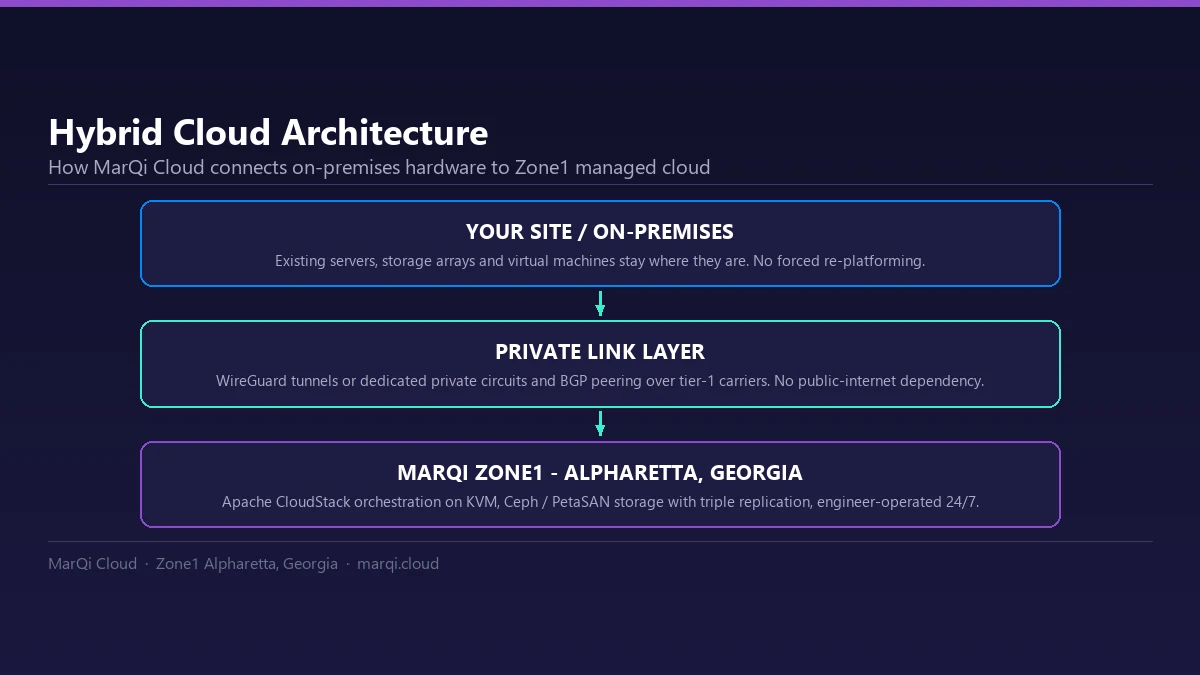
- Hybrid Cloud Deployment: MarQi Cloud supports hybrid deployment models, allowing you to manage on-premises and cloud resources seamlessly.
- Private and Secure Hosting: With our secure hosting environments, you can trust that your applications and data are safe.
- Business Continuity: We provide disaster recovery solutions to ensure your applications remain available even in case of failures.
Prerequisites for Deploying Kubernetes on MarQi Cloud VPS
Before you start the deployment process, ensure you have the following prerequisites:
- A MarQi Cloud VPS account.
- Basic knowledge of Linux command line.
- A domain name (optional for accessing your applications).
- SSH access to your VPS instance.
Step-by-Step Guide to Deploy Kubernetes on MarQi Cloud VPS
Step 1: Create a MarQi Cloud VPS Instance
1. Log in to your MarQi Cloud account and navigate to the VPS section.
2. Click on ‘Create VPS’ and choose an appropriate configuration (CPU, RAM, Storage) based on your needs.
3. Select the operating system (for example, Ubuntu LTS) that you are comfortable with.
4. Configure your network settings and SSH keys for secure access.
5. Launch the VPS instance.
Step 2: Access Your VPS via SSH
Once your VPS is up and running, connect to it using SSH:
ssh username@your_vps_ip
Step 3: Prepare the Node and Install a Container Runtime
Kubernetes runs containers through a runtime that implements the Container Runtime Interface (CRI). Since Kubernetes v1.24 it no longer talks to Docker Engine directly (the dockershim component was removed), so this guide uses containerd. First, turn off swap and enable IPv4 forwarding, both of which kubeadm expects (to keep swap off after a reboot, also disable it in /etc/fstab):
sudo swapoff -a
cat <net.ipv4.ip_forward = 1
EOF
sudo sysctl --system
Then install containerd and generate its default configuration:
sudo apt-get update
sudo apt-get install -y containerd
sudo mkdir -p /etc/containerd
containerd config default | sudo tee /etc/containerd/config.toml
In /etc/containerd/config.toml, set SystemdCgroup = true for the runc runtime (the section name differs between containerd 1.x and 2.x; see the Kubernetes container runtimes guide), make sure cri is not listed under disabled_plugins, then restart containerd:
sudo systemctl restart containerd
Step 4: Install Kubernetes
The legacy apt.kubernetes.io repository was frozen on September 13, 2023 and is no longer available, so use the community-owned pkgs.k8s.io repository. Each Kubernetes minor version has its own repository; replace v1.37 with the version you want to run:
sudo apt-get install -y apt-transport-https ca-certificates curl gpg
sudo mkdir -p -m 755 /etc/apt/keyrings
curl -fsSL https://pkgs.k8s.io/core:/stable:/v1.37/deb/Release.key | sudo gpg --dearmor -o /etc/apt/keyrings/kubernetes-apt-keyring.gpg
echo 'deb [signed-by=/etc/apt/keyrings/kubernetes-apt-keyring.gpg] https://pkgs.k8s.io/core:/stable:/v1.37/deb/ /' | sudo tee /etc/apt/sources.list.d/kubernetes.list
Install kubelet, kubeadm and kubectl, and hold their versions so routine package upgrades do not change them unexpectedly:
sudo apt-get update
sudo apt-get install -y kubelet kubeadm kubectl
sudo apt-mark hold kubelet kubeadm kubectl
Step 5: Initialize the Kubernetes Cluster
Initialize the control plane. The pod network range must match the network add-on you install next:
sudo kubeadm init --pod-network-cidr=10.244.0.0/16
After successful initialization, set up your kubeconfig:
mkdir -p $HOME/.kube
sudo cp -i /etc/kubernetes/admin.conf $HOME/.kube/config
sudo chown $(id -u):$(id -g) $HOME/.kube/config
Step 6: Install a Pod Network Add-On
To allow communication between your pods, install a network add-on. For example, you can use Flannel, which uses the 10.244.0.0/16 range set above:
kubectl apply -f https://github.com/flannel-io/flannel/releases/latest/download/kube-flannel.yml
Step 7: Join Worker Nodes (Optional)
If you have additional nodes to join to the cluster, run the join command provided at the end of the kubeadm init output on each worker node:
kubeadm join your_master_ip:6443 --token your_token --discovery-token-ca-cert-hash sha256:your_hash
Step 8: Verify the Installation
To verify that your Kubernetes cluster is up and running, use the following command:
kubectl get nodes
Best Practices for Managing Your Kubernetes Environment
Once your Kubernetes deployment is live, consider implementing the following best practices:
- Monitor Performance: Utilize monitoring tools to keep an eye on your cluster’s health and performance.
- Regular Backups: Implement a backup strategy to safeguard your data and configurations.
- Secure Your Cluster: Enable RBAC (Role-Based Access Control) to manage permissions and access within your cluster.
- Update Regularly: Keep your Kubernetes components and nodes updated to the latest stable versions.
Conclusion
Deploying Kubernetes on MarQi Cloud VPS provides a solid foundation for managing your containerized applications. With its enterprise-grade infrastructure, flexible pricing models, and robust support, MarQi Cloud makes it easy to scale your applications and ensure business continuity. By following this guide, you can confidently deploy Kubernetes and leverage its benefits in your organization.
FAQs
1. What is Kubernetes?
Kubernetes is an open-source platform for automating the deployment, scaling, and management of containerized applications.
2. Why use MarQi Cloud for Kubernetes?
MarQi Cloud offers enterprise-grade infrastructure, hybrid cloud support, and secure hosting environments, making it ideal for Kubernetes deployments.
3. What is a VPS?
A Virtual Private Server (VPS) is a virtualized server that mimics a dedicated server within a larger physical server, offering dedicated resources and increased control.
4. Can I scale my Kubernetes deployment on MarQi Cloud?
Yes, MarQi Cloud provides scalable compute and storage resources to accommodate your growing Kubernetes needs.
5. How do I secure my Kubernetes cluster?
Implement RBAC, network policies, and regular security audits to maintain a secure Kubernetes environment.
6. What backup solutions are available for Kubernetes on MarQi Cloud?
MarQi Cloud offers various business continuity and disaster recovery solutions to ensure your data is backed up and recoverable.
7. How do I monitor my Kubernetes cluster?
You can use monitoring tools like Prometheus, Grafana, or MarQi Cloud’s integrated monitoring solutions to keep track of your cluster’s performance.
8. Is technical support available for Kubernetes deployments on MarQi Cloud?
Yes, MarQi Cloud provides US-based infrastructure and support to assist you with your Kubernetes deployments.