

How MarQi Cloud Makes Cloud Simple Enough for a Solo Developer to Manage Alone
April 28, 2026
How MarQi Cloud’s Flat Learning Curve Saves New Customers Weeks of Onboarding
April 29, 2026
The MarQi Cloud Quick Start Guide: Everything Live in Under 30 Minutes
In today’s fast-paced digital world, businesses need a cloud solution that is not only robust but also easy to deploy. Enter MarQi Cloud, a provider of enterprise-grade cloud infrastructure that offers a quick start guide to help you get everything live in under 30 minutes. This article will walk you through the essential steps to set up your cloud environment quickly and efficiently, allowing you to leverage scalable compute and storage resources without unnecessary delays.
Why Choose MarQi Cloud?
Before diving into the quick start process, it’s essential to understand why MarQi Cloud is the right choice for your business. Here are some reasons:
- Enterprise-grade cloud infrastructure: MarQi Cloud offers a powerful and reliable infrastructure designed to meet the needs of businesses of all sizes.
- Hybrid cloud deployment models: Flexibility is key, and MarQi allows you to choose between public, private, or hybrid cloud solutions tailored to your specific requirements.
- Private and secure hosting environments: Security is paramount; MarQi Cloud ensures that your data remains private and secure with advanced encryption and compliance measures.
- Scalable compute and storage resources: As your business grows, so can your cloud resources. MarQi Cloud offers scalable solutions that adapt to your needs.
- Business continuity and disaster recovery solutions: Protect your business with comprehensive disaster recovery options that ensure you remain operational even during unforeseen events.
- Performance-driven infrastructure design: Enjoy high performance and reliability with MarQi’s infrastructure that is built for optimal speed and efficiency.
- US-based infrastructure and support: Receive localized support from experts who understand your needs and can help you navigate the cloud landscape.
- Flexible pricing models: Choose a pricing plan that fits your budget and business needs without compromising on quality.
Getting Started with MarQi Cloud
Setting up your MarQi Cloud environment is a straightforward process. Follow these steps to get everything live in under 30 minutes.
Step 1: Sign Up for an Account
The first step to accessing MarQi Cloud is to sign up for an account on the MarQi website. Visit MarQi Cloud and click on the ‘Sign Up’ button. Fill in your details, including your business name, email address, and contact information. Once completed, you will receive a confirmation email to activate your account.
Step 2: Choose Your Cloud Model
After logging into your account, you will be prompted to choose your desired cloud model. MarQi Cloud offers the following options:
- Public Cloud: Ideal for businesses looking for cost-effective solutions with shared resources.
- Private Cloud: Best suited for organizations needing dedicated resources and enhanced security.
- Hybrid Cloud: A combination of both public and private clouds, offering flexibility and scalability.
Select the model that best fits your business requirements.
Step 3: Set Up Your Virtual Machine
Once you have chosen your cloud model, it’s time to set up your virtual machine (VM). Navigate to the ‘Create VM’ section in your dashboard. Here, you will need to:
- Select your operating system (OS) from a list of available options, including various versions of Windows and Linux.
- Choose the specifications for your VM, including CPU, RAM, and storage size.
- Configure your networking settings, including IP address allocation and firewall rules.
After configuring your VM, click ‘Create’ to deploy it. The process typically takes just a few minutes.
Step 4: Configure Your Applications
With your VM up and running, it’s time to configure the applications that you will be using. MarQi Cloud provides a library of pre-configured applications that you can easily install. To install an application:
- Navigate to the ‘App Marketplace’ on your dashboard.
- Browse the available applications, which can include content management systems, databases, and development tools.
- Select the application you wish to install and follow the on-screen instructions.
Once installed, you can access the application through your VM.
Step 5: Set Up Security Features
Security is critical in today’s cloud environment. MarQi Cloud offers several security features that you should enable to protect your data:
- Firewalls: Configure firewalls to control incoming and outgoing traffic to your VM.
- Encryption: Enable encryption for data at rest and in transit to enhance security.
- Role-based access control: Set permissions for users accessing your cloud resources to ensure that sensitive data is protected.
Step 6: Implement Backup Solutions
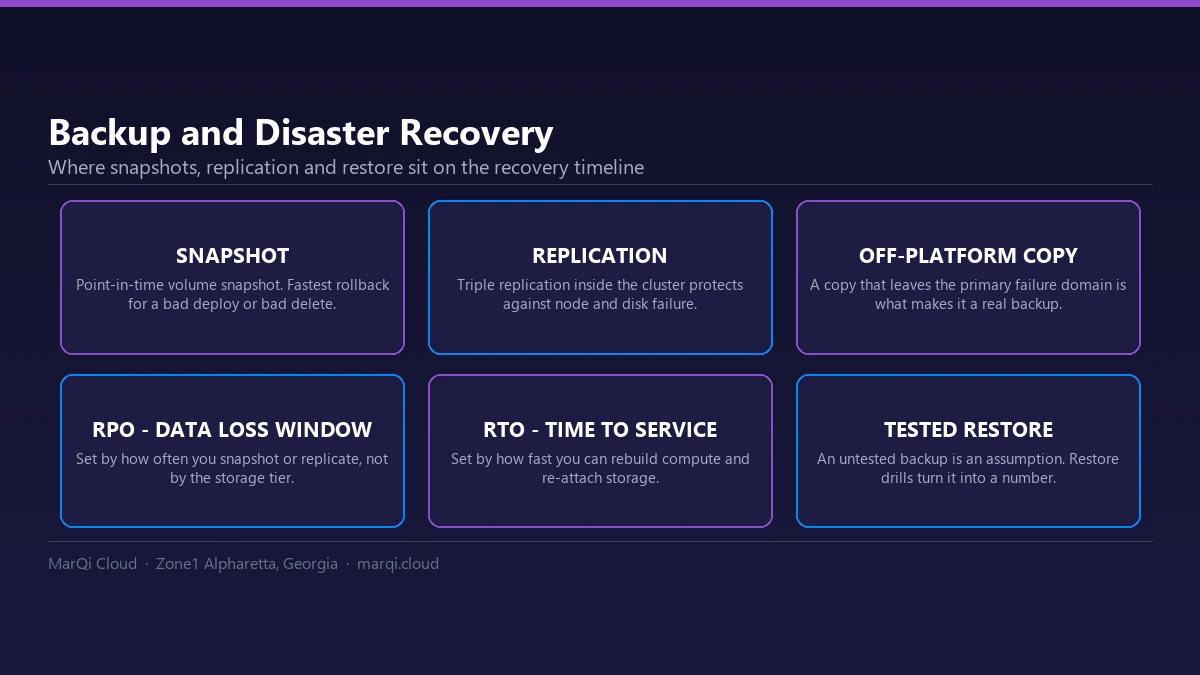
Data loss can occur due to various reasons, making it essential to have a backup solution in place. MarQi Cloud provides several options for backup:
- Automated backups: Schedule regular backups of your VM to ensure you do not lose critical data.
- Snapshot feature: Create snapshots of your VM at different points in time for easy recovery.
Step 7: Monitor Your Cloud Environment
After setting up your cloud environment, it’s crucial to monitor its performance. MarQi Cloud provides various monitoring tools that allow you to:
- Track resource usage, including CPU, RAM, and storage.
- Receive alerts for any performance issues.
- Generate reports to analyze trends and usage over time.
Step 8: Go Live!
Once you have completed the above steps, you are ready to go live! Test your applications, monitor performance, and make any adjustments as necessary. MarQi Cloud’s infrastructure is designed to ensure your applications run smoothly and efficiently.
Conclusion
With MarQi Cloud, getting your business live in under 30 minutes is not just a promise; it’s a reality. Following this quick start guide allows you to leverage enterprise-grade cloud infrastructure and enjoy the benefits of scalable resources, secure hosting, and flexible pricing models. Don’t hesitate to reach out to MarQi Cloud support at +1 770-369-9321 if you have any questions or need assistance during your setup process.
FAQ
1. What is MarQi Cloud?
MarQi Cloud is a provider of enterprise-grade cloud infrastructure that offers hybrid cloud deployment models, private hosting environments, and scalable resources.
2. How do I sign up for MarQi Cloud?
Visit the MarQi Cloud website and click on the ‘Sign Up’ button. Fill in the required information to create your account.
3. What cloud models does MarQi Cloud offer?
MarQi Cloud offers public, private, and hybrid cloud deployment models for businesses.
4. How long does it take to set up my cloud environment?
With MarQi Cloud, you can have everything live in under 30 minutes by following the quick start guide.
5. Is my data secure on MarQi Cloud?
Yes, MarQi Cloud provides private and secure hosting environments with advanced security measures in place.
6. Can I scale my resources with MarQi Cloud?
Yes. MarQi Cloud offers scalable compute and storage resources that grow with your business.
7. What support options are available?
MarQi Cloud offers US-based infrastructure and support to assist you with any issues or questions.
8. Are there flexible pricing models available?
Yes, MarQi Cloud provides flexible pricing models to fit various business needs and budgets.






