
Hybrid Cloud for Manufacturing and Logistics: Keeping Edge Systems Close to Core Applications
February 26, 2026
How BYO Hardware and Colocation Reduce Your Cloud Infrastructure Costs?
February 26, 2026
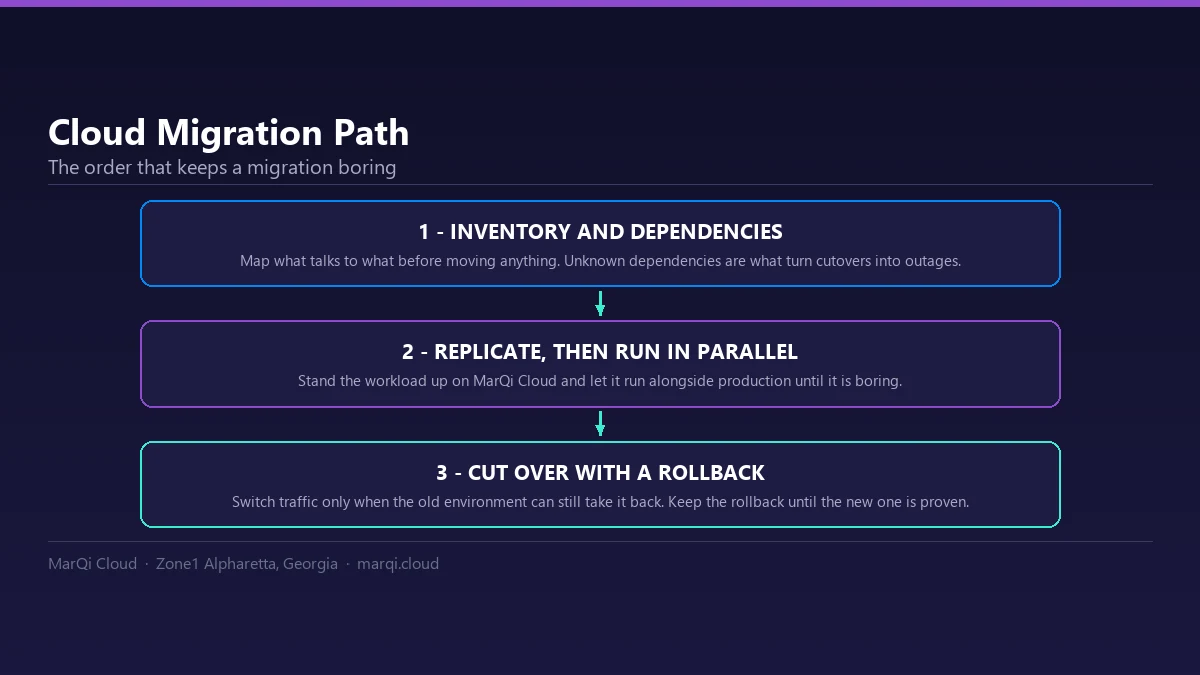
Cloud Migration Without Downtime: Blue/Green and Cutover Strategies
In today’s fast-paced digital landscape, businesses are increasingly migrating to the cloud to enhance their operational efficiency, scalability, and security. However, the prospect of migrating critical applications and data to the cloud can be daunting, particularly when it comes to avoiding downtime. Downtime can lead to lost revenue, decreased customer satisfaction, and potential reputational damage. In this comprehensive guide, we’ll explore two effective strategies for cloud migration without downtime: Blue/Green deployment and Cutover migration. We’ll also delve into the benefits of each strategy, best practices, and key considerations to ensure a smooth transition.
Understanding Cloud Migration
Cloud migration refers to the process of transferring data, applications, and other business elements from on-premises data centers or legacy systems to a cloud-based infrastructure. This transition can involve moving data to public clouds, private clouds, or hybrid cloud environments. Businesses choose to migrate to the cloud for various reasons, including improved performance, enhanced security, cost savings, and the ability to scale resources based on demand.
The Importance of Minimizing Downtime
Downtime during a migration can have significant repercussions for businesses. It can lead to:
- Loss of Revenue: Every minute of downtime can translate into lost sales, particularly for e-commerce businesses.
- Customer Dissatisfaction: Users expect seamless access to services; any interruption can result in frustration and loss of trust.
- Operational Disruption: Internal teams may struggle to work efficiently if critical applications are unavailable.
- Reputational Damage: Frequent downtimes can negatively affect a company’s reputation and brand loyalty.
To mitigate these risks, businesses often turn to strategies that allow for cloud migration without downtime.
Blue/Green Deployment Strategy
Blue/Green deployment is a release management strategy that reduces downtime and risk by running two identical production environments. One environment (the blue environment) is the live version that users interact with, while the other (the green environment) is a clone that can be updated or tested without affecting the live system.
How Blue/Green Deployment Works
The process involves the following steps:
- Setup Two Environments: Create a blue environment (current production) and a green environment (staging).
- Deploy to the Green Environment: Deploy new application versions or updates to the green environment without impacting the blue environment.
- Testing: Thoroughly test the green environment to ensure everything functions as expected.
- Switch Traffic: Once testing is completed, redirect user traffic from the blue environment to the green environment.
- Monitor and Rollback: Monitor the new environment for any issues. If problems arise, switch back to the blue environment.
Benefits of Blue/Green Deployment
Implementing a Blue/Green deployment strategy offers several advantages:
- No Downtime: Users experience seamless access as the switch happens quickly.
- Easy Rollback: If issues arise, reverting to the previous version is straightforward.
- Effective Testing: Testing in a production-like environment ensures more reliable deployments.
- Reduced Risk: The isolation of environments minimizes the risk of affecting users during updates.
Best Practices for Blue/Green Deployment
To maximize the effectiveness of a Blue/Green deployment strategy, consider the following best practices:
- Automate Deployments: Use automation tools to streamline the deployment process.
- Utilize Load Balancers: Load balancers can help manage traffic between environments efficiently.
- Implement Monitoring Tools: Continuous monitoring helps promptly identify and address any issues.
- Document Processes: Maintain documentation for future reference and to aid in troubleshooting.
Cutover Migration Strategy
Cutover migration is another strategy that enables businesses to migrate to the cloud with minimal or no downtime. Unlike Blue/Green deployment, Cutover migration involves moving all data and applications at once, typically during a planned maintenance window.
How Cutover Migration Works
Cutover migration typically follows these steps:
- Prepare the Cloud Environment: Set up the cloud infrastructure to receive the data and applications.
- Synchronize Data: Ensure that all data is synced between the on-premises system and the cloud environment.
- Schedule the Cutover: Choose an appropriate time for the cutover, often during off-peak hours.
- Execute the Cutover: Redirect all traffic from the on-premises system to the cloud environment.
- Post-Migration Validation: Verify that all applications and services are functioning correctly in the cloud.
Benefits of Cutover Migration
Cutover migration offers several benefits for organizations:
- Simplicity: The straightforward approach makes it easy to understand and implement.
- Fast Migration: The migration can often be completed in a short time frame.
- Minimized Complexity: Fewer moving parts make it easier to manage the migration process.
- Clear Cutover Point: Teams know exactly when to expect the transition, allowing for better planning.
Best Practices for Cutover Migration
To ensure a successful Cutover migration, consider these best practices:
- Thorough Planning: Create a detailed migration plan that outlines every step of the process.
- Conduct a Dry Run: Perform a test migration to identify potential issues before the actual cutover.
- Communicate with Stakeholders: Keep all relevant parties informed about the migration schedule and expectations.
- Have a Rollback Plan: Prepare for contingencies by having a rollback plan in case of unexpected issues.
Choosing the Right Strategy for Your Organization
When deciding between Blue/Green deployment and Cutover migration, consider the following factors:
- Complexity of Applications: If your applications are complex and require extensive testing, Blue/Green deployment may be preferable.
- Time Constraints: If time is of the essence, Cutover migration may be the faster option.
- Risk Tolerance: Assess your organization’s risk tolerance; Blue/Green deployments generally reduce risk.
- Resource Availability: Evaluate the availability of resources and expertise within your team.
Conclusion
Cloud migration does not have to mean downtime. By carefully choosing between Blue/Green deployment and Cutover migration strategies, organizations can successfully transition to the cloud while minimizing disruption to their operations. Both strategies offer unique benefits and considerations, so understanding your specific needs and requirements is crucial. At MarQi Cloud, we provide enterprise-grade cloud infrastructure and support to assist your organization in navigating the complexities of cloud migration. Our flexible pricing models and performance-driven infrastructure ensure your business can thrive in the cloud environment.
Frequently Asked Questions (FAQ)
What is cloud migration?
Cloud migration is the process of transferring data, applications, and other business elements from on-premises data centers or legacy systems to a cloud-based infrastructure.
What are Blue/Green deployments?
Blue/Green deployments are a release management strategy that involves running two identical production environments to minimize downtime and reduce risk during updates or migrations.
What is Cutover migration?
Cutover migration is a strategy that involves moving all data and applications to the cloud at once, typically during a planned maintenance window.
How do I decide between Blue/Green and Cutover migration?
Consider factors such as application complexity, time constraints, risk tolerance, and resource availability to determine the best strategy for your organization.
Can I test my migration strategy before going live?
Yes, it is advisable to conduct a dry run or test migration to identify potential issues before executing the actual migration.
What are the risks of cloud migration?
Risks can include data loss, downtime, compatibility issues, and security vulnerabilities if the migration is not properly planned and executed.
How can MarQi Cloud help with cloud migration?
MarQi Cloud provides enterprise-grade cloud infrastructure, hybrid deployment models, and expert support to assist organizations in planning and executing seamless cloud migrations.
What support options are available during migration?
MarQi Cloud offers US-based infrastructure and support, along with business continuity and disaster recovery solutions to ensure a smooth migration experience.
What pricing models does MarQi Cloud offer?
We offer flexible pricing models to accommodate various business needs and budgets, ensuring you only pay for the resources you use.
Is it possible to rollback a migration if issues arise?
Yes, both Blue/Green deployment and Cutover migration can include rollback plans to revert to the previous environment in case of unexpected issues.






