Public Cloud Bills Getting Wild? How Resource Pools Restore Predictable Costs
February 28, 2026
How to Build a Secure VPC for Remote Teams: Implementing VPN and Segmentation
March 1, 2026
Colocation in the USA: The 30-Day Move Checklist for Power, Cross-Connects, and Remote Hands
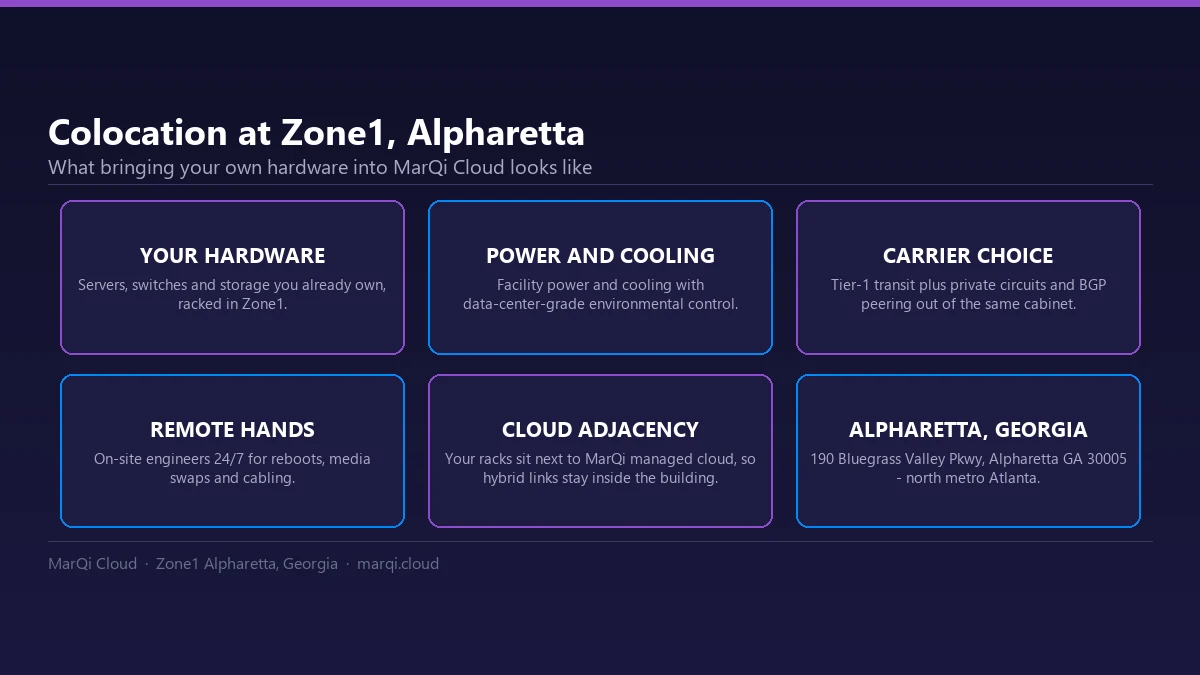
When businesses decide to move their IT infrastructure to a colocation facility in the USA, the process can seem overwhelming. This is especially true when it comes to managing power, cross-connects, and remote hands services. However, with a well-structured 30-day checklist, the transition to a colocation facility can be smooth and efficient. In this article, we will provide a comprehensive checklist to ensure your move is successful, while also exploring the importance of each aspect involved in the process.
Understanding Colocation
Before diving into the checklist, it’s essential to understand what colocation is. Colocation involves renting space in a data center to house your servers and other computing hardware. This allows businesses to leverage enterprise-grade infrastructure while maintaining control over their equipment.
Benefits of Colocation
Colocation offers numerous advantages, including:
- Enterprise-grade cloud infrastructure: By utilizing a colocation facility, you gain access to high-quality hardware and resources that may be cost-prohibitive for individual businesses.
- Hybrid cloud deployment models: Colocation supports hybrid cloud strategies, allowing businesses to combine on-premises and cloud environments seamlessly.
- Private and secure hosting environments: With dedicated space in a data center, your servers are protected from physical threats and environmental disasters.
- Scalable compute and storage resources: As your business grows, you can easily scale your resources without the need for significant capital investment.
- Business continuity and disaster recovery solutions: Colocation facilities often provide backup power, cooling, and redundant systems to ensure uptime during emergencies.
- Performance-driven infrastructure design: Data centers are optimized for speed and reliability, enhancing your overall IT performance.
- US-based infrastructure and support: Many colocation providers have their facilities based in the USA, offering localized support and services.
- Flexible pricing models: Colocation services often come with various pricing plans, enabling businesses to choose a solution that fits their budget.
30-Day Move Checklist
The following checklist is a comprehensive guide to help you plan your move to a colocation facility effectively:
Week 1: Planning and Preparation
1. Assess Your Current Infrastructure
Take inventory of your existing hardware, software, and network resources. This will help you understand what needs to be moved and what can be left behind.
2. Define Your Objectives
Identify the specific goals you want to achieve with your move to colocation. Consider factors such as performance, security, and scalability.
3. Choose the Right Colocation Provider
Research potential colocation providers in the USA. Look for those that offer the services and support you need, including power management, cross-connect options, and remote hands services.
Week 2: Power Management
4. Understand Power Requirements
Evaluate the power requirements of your equipment. Determine the amount of power needed and any redundancy requirements.
5. Coordinate with Your Provider
Discuss power options with your chosen colocation provider. Ensure they can meet your power needs and provide information on UPS (Uninterruptible Power Supply) systems and backup generators.
6. Plan for Power Distribution
Decide how you will distribute power within the colocation space. Plan the layout of power strips and PDUs (Power Distribution Units) to optimize efficiency.
Week 3: Cross-Connects
7. Identify Interconnection Needs
Assess your need for cross-connects with other networks, cloud providers, or partners. Understanding your connectivity requirements is crucial for a successful move.
8. Confirm Cross-Connect Availability
Verify that your colocation provider can accommodate your cross-connect needs. Discuss options for direct connections and network redundancy.
9. Plan for Network Configuration
Document your network configuration to ensure a seamless transition. This includes IP addressing, VLAN configurations, and any required routing changes.
Week 4: Remote Hands and Final Preparations
10. Evaluate Remote Hands Services
Determine your need for remote hands services. These can be invaluable for managing hardware issues, conducting routine maintenance, or performing installations.
11. Schedule the Move
Coordinate the actual move with your colocation provider. Set a timeline, ensuring that all parties are informed and prepared for the transition.
12. Test Your Setup
Once your equipment is in place, conduct thorough testing of all systems. Verify power, connectivity, and performance to ensure everything is functioning correctly.
Post-Move Activities
13. Monitor Performance
After the move, continuously monitor your systems’ performance. This will help you identify any potential issues early on.
14. Evaluate Provider Support
Assess the level of support provided by your colocation provider. Ensure they are responsive and helpful in addressing any concerns.
Conclusion
Moving to a colocation facility in the USA can be a complex process, but with a detailed 30-day checklist, you can streamline your transition. By focusing on power management, cross-connects, and remote hands services, you can enhance your infrastructure’s performance and reliability. If you have any questions about colocation or need assistance with your move, feel free to reach out to MarQi Cloud at +1 770-369-9321.
FAQs
1. What is colocation?
Colocation is the practice of renting space in a data center to house your servers and other IT equipment.
2. How does colocation benefit my business?
Colocation provides access to enterprise-grade infrastructure, security, scalability, and improved performance.
3. What should I consider when choosing a colocation provider?
Consider factors such as power management, connectivity options, security measures, and support services.
4. What are cross-connects, and why are they important?
Cross-connects allow you to connect your equipment to other networks or services, enhancing your connectivity options.
5. What are remote hands services?
Remote hands services refer to on-site support provided by the colocation facility for tasks such as equipment installation and maintenance.
6. How do I determine my power requirements for colocation?
Evaluate the power needs of your servers and hardware, including any redundancy requirements.
7. What is the typical timeline for a colocation move?
A colocation move can typically be completed within 30 days, depending on the complexity of your infrastructure.
8. Can I scale my resources in a colocation facility?
Yes, colocation facilities allow you to scale your compute and storage resources as your business grows.
9. Are colocation services expensive?
Colocation costs vary based on factors such as space, power, and services required, but flexible pricing models are often available.
10. How do I ensure my data is secure in a colocation facility?
Choose a provider with robust security measures in place, including physical security, fire protection, and network security protocols.