How to Build a MarQi Cloud Disaster Recovery Plan That Actually Works
April 7, 2026
How to Set Resource Quotas on MarQi Cloud to Prevent Runaway Costs
April 8, 2026
MarQi Cloud Backup Automation: How to Never Manually Snapshot Again
In today’s fast-paced digital landscape, data is the lifeblood of any organization. From critical business applications to customer information, ensuring data security and accessibility is paramount. At MarQi Cloud, we understand the importance of reliable data backup solutions. This article explores how MarQi Cloud Backup Automation can transform your approach to data management, allowing you to eliminate the need for manual snapshots and ensure seamless data protection.
Understanding Backup Automation
Backup automation refers to the process of using software tools and solutions to automatically create and manage data backups without the need for human intervention. This approach not only saves time but also reduces the risk of human error, ensuring that your data is consistently protected.
The Importance of Automated Backups
Manual backups can be tedious and prone to mistakes. Automated backups streamline the process, guaranteeing that your data is backed up at regular intervals. Here are several key benefits of implementing backup automation:
- Time Efficiency: Automating backups allows IT teams to focus on other critical tasks, reducing downtime and increasing productivity.
- Consistency: Automated backups are performed on a set schedule, ensuring that data is regularly backed up without the risk of forgetting.
- Enhanced Security: With automation, the risk of human error is minimized, leading to more secure data management practices.
- Disaster Recovery: In the event of data loss, automated backups provide a reliable means for quick recovery, minimizing downtime.
MarQi Cloud’s Backup Automation Features
MarQi Cloud offers a robust backup automation solution designed to meet the needs of businesses of all sizes. Here are some of the key features:
1. Scheduled Backups
With MarQi Cloud, you can set your backups to occur at specific intervals, whether hourly, daily, or weekly. This flexibility allows you to define a backup schedule that aligns with your business operations.
2. Incremental Backups
Our backup solution supports incremental backups, which means only the changes made since the last backup are saved. This reduces storage requirements and speeds up the backup process.
3. Secure Storage
MarQi Cloud ensures that your backups are stored in a secure environment. Our private and secure hosting environments provide peace of mind, knowing that your data is protected from unauthorized access.
4. Easy Restoration
In addition to automating backups, our platform allows for quick and easy restoration of data. Whether you need to recover a single file or an entire system, our intuitive interface simplifies the process.
5. Flexible Pricing Models
At MarQi Cloud, we offer flexible pricing models to cater to various business needs. Our pricing is designed to provide the best value for enterprise-grade cloud infrastructure without compromising on performance.
Implementing Backup Automation with MarQi Cloud
Getting started with MarQi Cloud’s backup automation is straightforward. Follow these steps to implement an automated backup solution for your organization:
Step 1: Assess Your Backup Needs
Evaluate what data needs to be backed up and how often. Consider factors such as data criticality, compliance requirements, and recovery time objectives.
Step 2: Choose the Right Plan
Select a plan that fits your organization’s requirements. MarQi Cloud offers various options, allowing you to choose the right level of service.
Step 3: Configure Backup Settings
Use our user-friendly dashboard to configure your backup settings. Set your preferred schedule, choose between full and incremental backups, and specify retention policies.
Step 4: Monitor and Adjust
Once your automated backups are set up, monitor their performance through our dashboard. Make any necessary adjustments to ensure optimal operation.
Best Practices for Data Backup Management
To maximize the effectiveness of your backup automation, consider the following best practices:
1. Regularly Test Restores
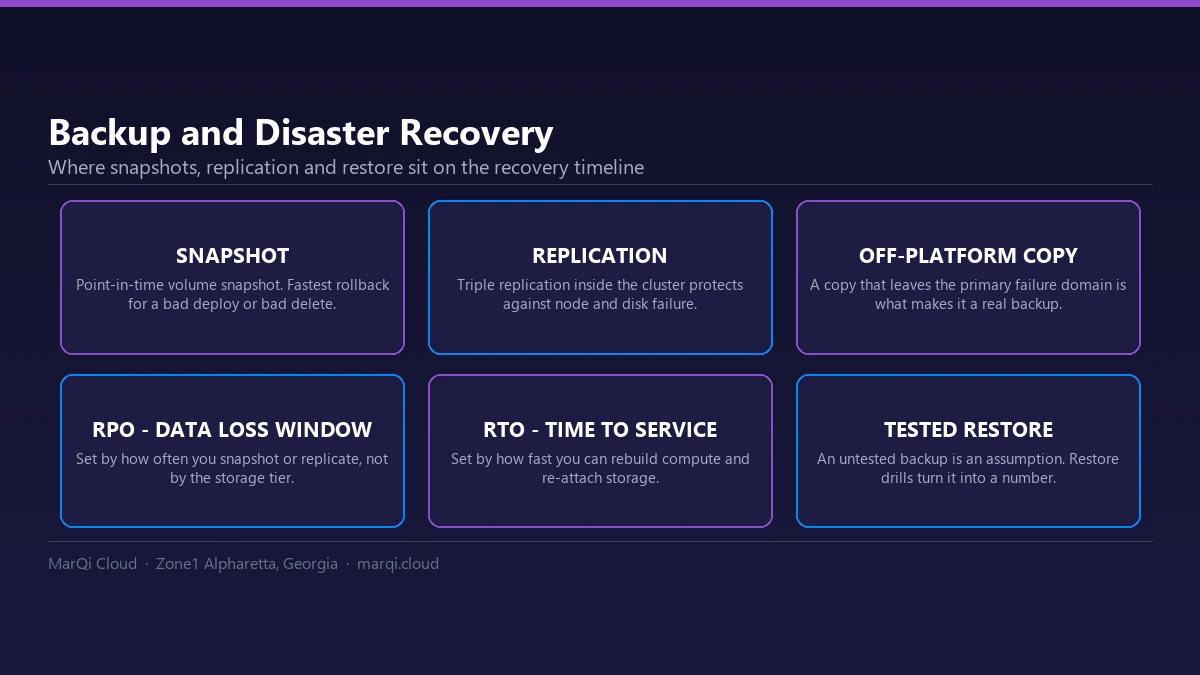
Testing your backups is crucial. Schedule regular restore tests to ensure that your data can be recovered successfully when needed.
2. Implement a 3-2-1 Backup Strategy
This strategy involves keeping three copies of your data, on two different media types, with one copy stored offsite. This approach provides additional redundancy and security.
3. Stay Informed About Compliance
Ensure that your backup practices comply with industry regulations and standards. This is especially important for businesses in regulated sectors.
4. Keep Your Software Updated
Regularly update your backup software to take advantage of the latest features and security enhancements.
Conclusion
Backup automation is an essential component of modern data management strategies. With MarQi Cloud, you can eliminate the hassle of manual snapshots and ensure that your data is continuously protected. Our enterprise-grade cloud infrastructure, coupled with flexible pricing models and robust security measures, makes MarQi Cloud an ideal partner for your backup needs.
For more information on how MarQi Cloud can revolutionize your data backup processes, contact us at +1 770-369-9321. Our dedicated team is ready to assist you in implementing a backup solution that meets your specific requirements.
FAQ
1. What is backup automation?
Backup automation is the process of using software to automatically create and manage data backups without manual intervention.
2. Why should I automate my backups?
Automating backups saves time, reduces human error, ensures consistency, and enhances data security.
3. How does MarQi Cloud ensure data security?
MarQi Cloud provides secure hosting environments and robust security measures to protect your data from unauthorized access.
4. Can I schedule backups at specific times?
Yes, MarQi Cloud allows you to schedule backups at your preferred intervals, whether hourly, daily, or weekly.
5. What are incremental backups?
Incremental backups save only the changes made since the last backup, reducing storage requirements and speeding up the process.
6. How can I restore my data from backups?
MarQi Cloud provides an intuitive interface that allows you to easily restore data, whether it’s a single file or an entire system.
7. What is the 3-2-1 backup strategy?
The 3-2-1 backup strategy involves keeping three copies of data on two different media types, with one copy stored offsite.
8. How do I choose the right backup plan?
Assess your organization’s data needs and select a plan that aligns with your requirements. Our team can assist you in making the best choice.