How to Move Your Collocated Server to MarQi Cloud Without Any Downtime
May 16, 2026
How MarQi Cloud BYO Hardware Works: A Technical Deep Dive
May 16, 2026
The Step-by-Step Guide to Connecting Your On-Premise Hardware to MarQi Cloud
As businesses increasingly migrate to cloud environments, understanding how to connect on-premise hardware to cloud services becomes critical. This guide will walk you through the process of linking your on-premise infrastructure to MarQi Cloud’s enterprise-grade cloud infrastructure, ensuring you can leverage the benefits of hybrid cloud deployment models while maintaining a secure and reliable hosting environment.
Understanding the Basics of Cloud Connectivity
Before delving into the specifics of connecting your on-premise hardware to MarQi Cloud, it’s essential to understand what cloud connectivity means and why it is crucial for your business. Cloud connectivity refers to the methods and technologies used to link local hardware and infrastructure to cloud services. This connection allows for data transfer, application integration, and operational efficiency.
Why Connect to MarQi Cloud?
MarQi Cloud offers various advantages for businesses looking to enhance their IT infrastructure. Here are some key reasons to connect your on-premise hardware to MarQi Cloud:
- Enterprise-Grade Cloud Infrastructure: Enjoy robust performance and reliability.
- Hybrid Cloud Deployment Models: Flexibility to choose between public, private, or hybrid environments.
- Private and Secure Hosting Environments: Ensure data security and compliance.
- Scalable Compute and Storage Resources: Adjust resources based on your needs.
- Business Continuity and Disaster Recovery Solutions: Protect your data with reliable backup options.
Step 1: Assess Your Current Infrastructure
Before starting the connection process, evaluate your existing on-premise infrastructure. This assessment should include:
- Hardware Inventory: Identify all servers, storage devices, and network components.
- Software Requirements: Review software applications and dependencies.
- Network Configuration: Understand your current network setup, including firewalls and IP addressing.
Step 2: Choose the Right Connection Method
There are several methods for connecting your on-premise hardware to MarQi Cloud. The choice of method will depend on your business needs, existing infrastructure, and desired performance:
Direct Connect
This method provides a dedicated, private connection between your on-premise infrastructure and MarQi Cloud. It is ideal for businesses requiring high bandwidth and low latency.
VPN Connection
A Virtual Private Network (VPN) is a cost-effective solution that allows secure communication over the internet. It is suitable for businesses with lower bandwidth requirements.
Hybrid Connection
This approach combines multiple connection methods, allowing you to utilize both direct connect and VPN for flexibility and redundancy.
Step 3: Setting Up Network Configuration
Once you’ve chosen your connection method, you need to configure your network settings. This will involve:
- Configuring Firewalls: Ensure that your firewall settings allow traffic to and from MarQi Cloud.
- Setting Up IP Addressing: Assign static IP addresses to your on-premise hardware for consistent connectivity.
- Routing Configuration: Adjust routing tables to direct traffic appropriately.
Step 4: Establishing the Connection
With your network configured, you can now set up the actual connection:
For Direct Connect
- Contact MarQi Cloud to initiate the Direct Connect setup.
- Follow the instructions provided to establish the physical connection.
- Test the connection for performance and reliability.
For VPN Connection
- Set up the VPN server on your on-premise infrastructure.
- Configure VPN client settings on MarQi Cloud.
- Conduct thorough testing to ensure secure connectivity.
Step 5: Data Migration
Once the connection is established, you may need to migrate data between your on-premise hardware and MarQi Cloud. Consider the following steps:
- Select Data to Migrate: Identify which data sets are necessary for your cloud operations.
- Choose Migration Tools: Utilize tools provided by MarQi Cloud or third-party solutions.
- Perform Migration: Execute the data transfer, ensuring to monitor for errors.
Step 6: Implementing Security Measures
Security is paramount when connecting on-premise hardware to the cloud. Implement the following measures to protect your data:
- Encryption: Ensure that data is encrypted both in transit and at rest.
- Access Controls: Set strict permissions for who can access data in the cloud environment.
- Regular Audits: Conduct security audits to identify vulnerabilities and threats.
Step 7: Monitoring and Maintenance
After establishing your connection and migrating data, it’s crucial to continuously monitor and maintain your cloud environment. This includes:
- Performance Monitoring: Track the performance of applications and services.
- Regular Updates: Keep systems updated to protect against vulnerabilities.
- Backup and Recovery Testing: Regularly test your backup solutions to ensure data integrity.
Step 8: Leveraging MarQi Cloud Services
Once your on-premise hardware is successfully connected to MarQi Cloud, you can begin leveraging the various services offered:
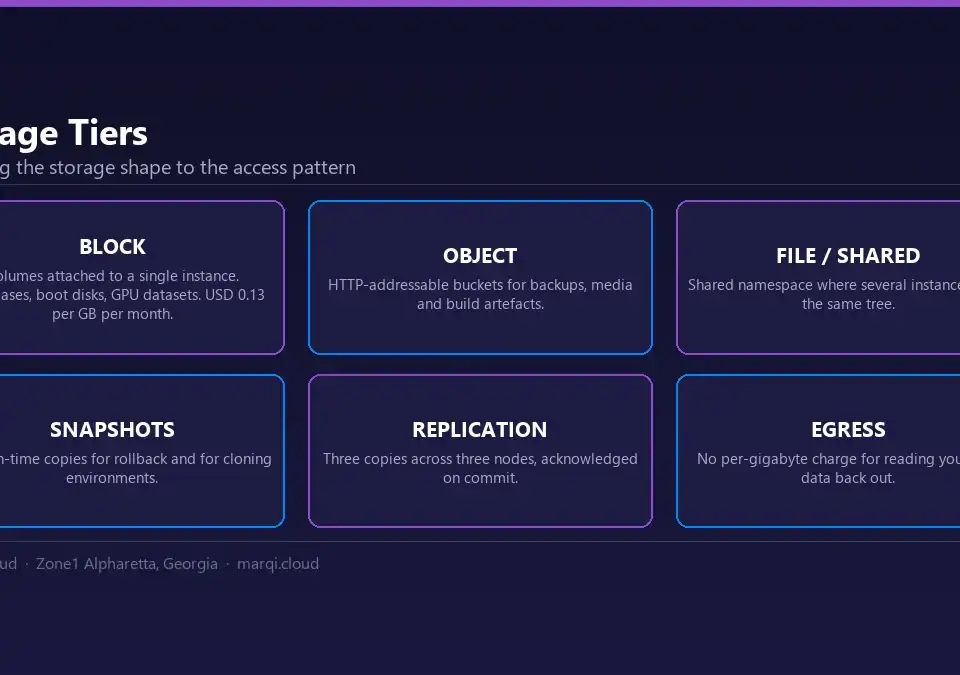
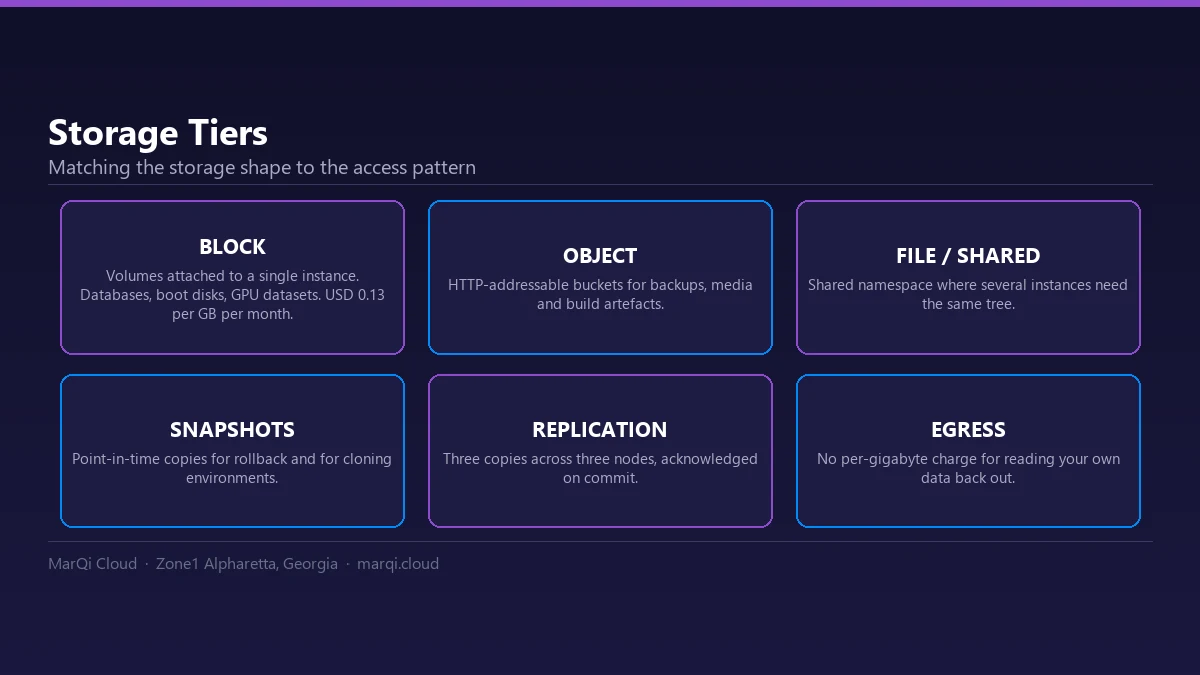
- Scalable Compute and Storage: Adjust resources based on demand.
- Business Continuity Solutions: Implement disaster recovery plans.
- Flexible Pricing Models: Utilize cost-effective solutions that fit your budget.
Conclusion
Connecting your on-premise hardware to MarQi Cloud opens new doors for efficiency, scalability, and security. By following this step-by-step guide, you can ensure a smooth transition and maximize the benefits of your cloud infrastructure.
Frequently Asked Questions (FAQ)
1. What is MarQi Cloud?
MarQi Cloud is an enterprise-grade cloud infrastructure provider offering hybrid cloud deployment models and secure hosting environments.
2. How do I choose the right connection method?
Evaluate your bandwidth needs, security requirements, and budget to determine whether to use Direct Connect, VPN, or a hybrid approach.
3. What are the benefits of a Direct Connect?
Direct Connect provides high bandwidth and low latency, making it ideal for data-intensive applications.
4. What security measures should I implement?
Implement encryption, access controls, and regular security audits to protect your data.
5. How do I migrate data to MarQi Cloud?
Select necessary data, choose migration tools, and execute the transfer while monitoring for errors.
6. How can I monitor my cloud connection?
Use performance monitoring tools to track application performance and ensure connectivity.
7. What should I do if I encounter issues during the connection process?
Contact MarQi Cloud support at +1 770-369-9321 for assistance.
8. Can I scale my resources in MarQi Cloud?
Yes, MarQi Cloud offers scalable compute and storage resources to meet varying demands.
9. What is business continuity and disaster recovery?
Business continuity ensures ongoing operations during disruptions, while disaster recovery focuses on restoring systems after a failure.
10. What are the pricing models available?
MarQi Cloud offers flexible pricing models tailored to fit various business needs and budgets.