How to Choose a US Colocation Provider: 25 Questions to Ask
March 4, 2026
High-IOPS Storage: Why It Matters for Databases and Analytics
March 4, 2026
Cloud Storage for Enterprises: Understanding Block, Object, and File Storage
In today’s digital age, cloud storage has become an essential component for enterprises looking to leverage technology for improved efficiency and data management. With the vast array of options available, it can be overwhelming for businesses to choose the right type of cloud storage. This article aims to demystify three primary cloud storage types: block storage, object storage, and file storage. We will explore their characteristics, use cases, and benefits to help you make an informed decision for your enterprise needs.
What is Cloud Storage?
Cloud storage refers to the practice of storing data on remote servers accessed via the internet, rather than on local servers or personal computers. This technology enables businesses to store, manage, and retrieve data without the need for on-premises infrastructure. Cloud storage solutions offer scalability, cost-effectiveness, and flexibility, making them a popular choice among enterprises of all sizes.
Types of Cloud Storage
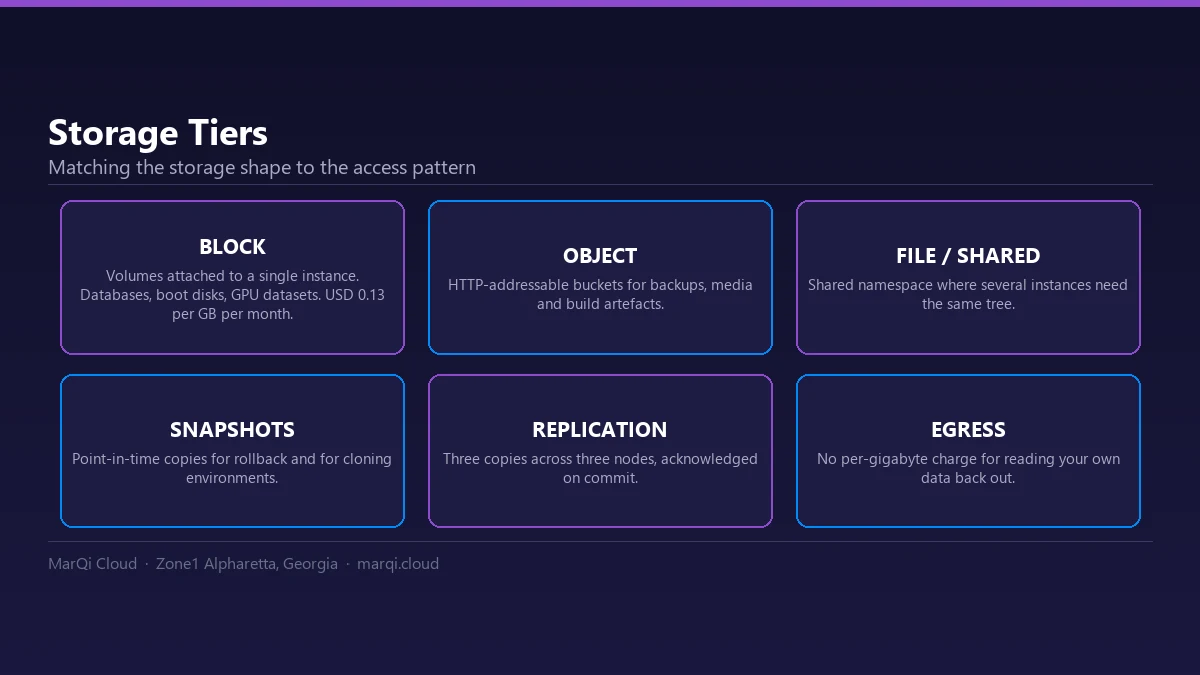
There are three primary types of cloud storage that enterprises can choose from: block storage, object storage, and file storage. Each type has its own unique characteristics and advantages.
Block Storage
Block storage is a type of cloud storage that divides data into blocks, each with a unique identifier. This technology is commonly used in environments where high performance and low latency are critical, such as databases and virtual machines.
Characteristics of Block Storage
- Performance: Block storage provides high-speed access to data, making it ideal for I/O-intensive applications.
- Low Latency: With direct access to individual blocks, latency is minimized, ensuring quick data retrieval.
- Customizable: Enterprises can configure block storage to meet specific application requirements.
- File System Not Required: Block storage can operate independently of a file system, allowing for more efficient data management.
Use Cases for Block Storage
- Databases: Block storage is widely used in database applications that require consistent performance and quick access to data.
- Virtual Machines: Many cloud providers use block storage to support virtual machine instances, as it allows for rapid provisioning and scalability.
- Transactional Applications: Applications that require high transaction rates benefit from the low latency of block storage.
Object Storage
Object storage is a cloud storage architecture that manages data as discrete units called objects. Each object is tagged with metadata, making it easy to retrieve and manage large amounts of unstructured data.
Characteristics of Object Storage
- Scalability: Object storage is designed to handle vast amounts of data, making it ideal for enterprises with growing data needs.
- Metadata Rich: Each object contains metadata that allows for better organization and retrieval of data.
- Cost-Effective: Object storage solutions are often more affordable, especially for storing large volumes of unstructured data.
- Accessibility: Data stored in object storage can be accessed from anywhere via APIs, enhancing collaboration and flexibility.
Use Cases for Object Storage
- Backup and Archiving: Object storage is an excellent option for long-term data retention and backup due to its cost-effectiveness.
- Media and Content Delivery: Streaming services and media companies use object storage to manage and deliver large media files efficiently.
- Big Data Analytics: Object storage can handle the massive datasets required for big data analytics, making it a popular choice for data scientists.
File Storage
File storage, also known as file-level storage, organizes data in a hierarchy of files and folders, similar to traditional file systems. This type of storage is often used for shared files and collaborative work environments.
Characteristics of File Storage
- User-Friendly: File storage mimics traditional file systems, making it easy for users to navigate and manage files.
- Collaboration: File storage solutions often include features that facilitate collaboration among teams.
- Structured Organization: Files and folders can be organized in a way that reflects the user’s needs, improving accessibility.
- Compatibility: File storage is compatible with various operating systems and applications, ensuring seamless integration.
Use Cases for File Storage
- Document Management: Enterprises use file storage for managing documents and ensuring easy access for employees.
- Shared Drives: File storage is ideal for creating shared drives where multiple users can collaborate on projects.
- Content Management Systems: Many CMS platforms utilize file storage for organizing and managing website content.
Choosing the Right Storage Solution for Your Enterprise
When selecting a cloud storage solution, it is essential to consider the specific needs of your enterprise. Factors such as performance requirements, data types, scalability, and budget will influence your decision. Here are some guidelines to help you choose the right storage solution:
Assess Your Data Needs
Determine the type of data your enterprise will manage. If you handle large volumes of unstructured data, object storage may be the best option. For applications requiring high performance and low latency, block storage is preferable. File storage is suitable for collaborative environments with shared files.
Evaluate Performance Requirements
Consider the performance requirements of your applications. If your applications require rapid access to data, block storage is the ideal choice. For less performance-sensitive applications, file or object storage may suffice.
Consider Scalability
Ensure that the chosen storage solution can scale with your business. Object storage is particularly known for its scalability, making it suitable for enterprises anticipating growth.
Budget Constraints
Analyze your budget for cloud storage solutions. Object storage is often more cost-effective for large data volumes, while block storage may incur higher costs due to its performance advantages.
Conclusion
Choosing the right cloud storage for your enterprise is crucial for optimizing performance, managing costs, and ensuring data accessibility. By understanding the differences between block, object, and file storage, you can make an informed decision that aligns with your business objectives. Each storage type has its unique advantages and use cases, so consider your enterprise’s specific needs before making a choice.
FAQ
1. What is block storage?
Block storage is a type of cloud storage that divides data into blocks, allowing for high-speed access and low latency, suitable for performance-intensive applications.
2. What is object storage?
Object storage manages data as discrete units called objects, each with metadata, making it ideal for unstructured data storage and large datasets.
3. What is file storage?
File storage organizes data in a hierarchy of files and folders, similar to traditional file systems, making it user-friendly and suitable for collaboration.
4. When should I use block storage?
Block storage is best for applications requiring high performance, such as databases and virtual machines.
5. What are the advantages of object storage?
Object storage offers scalability, cost-effectiveness, and rich metadata capabilities, making it ideal for managing large volumes of unstructured data.
6. Can I use file storage for backups?
While file storage can be used for backups, object storage is generally more cost-effective for long-term data retention and archiving.
7. How do I choose the right cloud storage for my enterprise?
Assess your data needs, performance requirements, scalability, and budget to determine which cloud storage solution is best for your enterprise.
8. Is cloud storage secure?
Most cloud storage providers offer robust security measures, including encryption and access controls, to ensure the safety of your data.
9. What are common use cases for block storage?
Common use cases for block storage include databases, virtual machines, and transactional applications requiring consistent performance.
10. How does file storage facilitate collaboration?
File storage solutions often include features that allow multiple users to access and edit shared files, enhancing team collaboration.