Incident Response in the Cloud: A Comprehensive US Business Runbook
March 5, 2026
How to Build a High-Availability Stack for US Web Apps
March 5, 2026
Backup Strategy for US Businesses: Implementing the 3-2-1 Rule with Immutable Backups
In today’s digital landscape, data is the lifeblood of businesses across the United States. As companies increasingly rely on technology, the importance of a robust backup strategy has never been greater. A sound backup strategy not only protects vital information but also ensures business continuity in the event of data loss due to cyberattacks, hardware failures, or natural disasters. One of the most effective methodologies for safeguarding data is the 3-2-1 backup rule, complemented by the use of immutable backups. This article delves into the 3-2-1 rule, the significance of immutable backups, and how US businesses can implement these strategies to secure their data.
Understanding the 3-2-1 Backup Rule
The 3-2-1 backup rule is a widely recognized strategy designed to provide comprehensive data protection. This rule outlines three key principles for businesses to adhere to when creating their backup strategy:
1. Keep Three Copies of Your Data
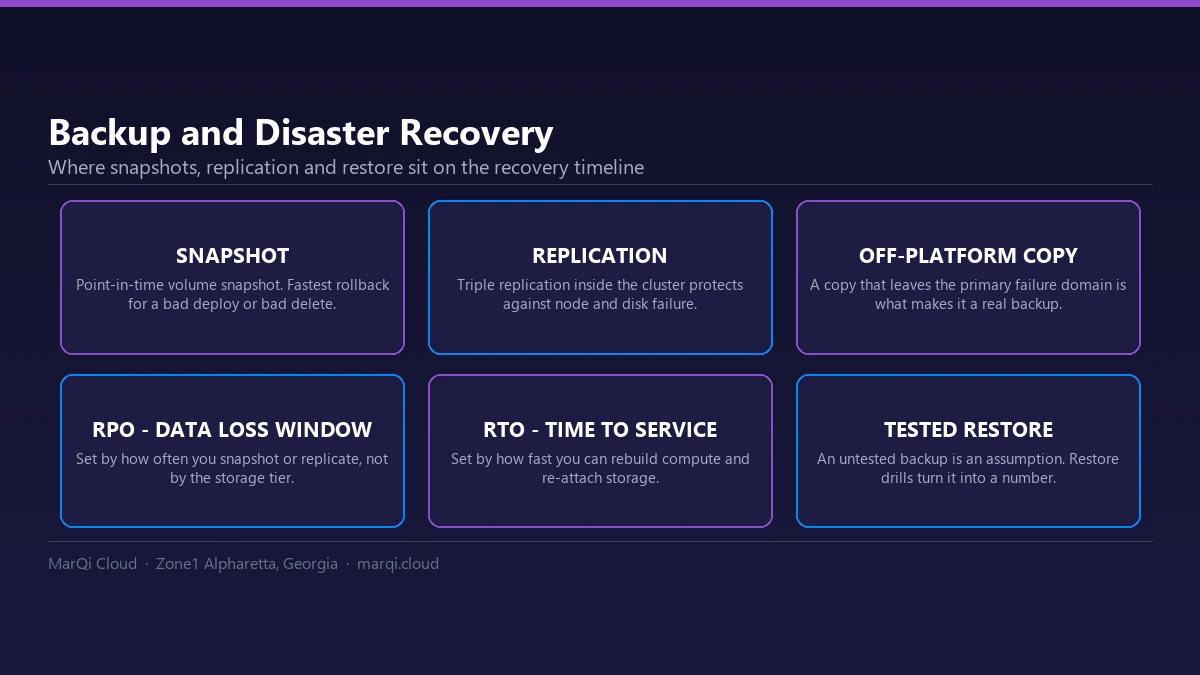
The first principle of the 3-2-1 rule is to maintain three copies of your data. This includes the original data and two backups. By having multiple copies, businesses can mitigate the risk of losing their data due to a single point of failure. If one copy is compromised, the other backups can be used to restore the information.
2. Store Data on Two Different Media Types
The second aspect of the 3-2-1 rule emphasizes the importance of diversifying the storage media. Businesses should not only keep their primary data and backups on the same type of storage device. Instead, they should utilize at least two different types of media to store their data. For instance, a business could use an on-premise hard drive for one backup and a cloud-based service for another. This approach reduces the risk of simultaneous failure due to hardware issues.
3. Keep One Copy Offsite
The third principle of the 3-2-1 rule stresses the importance of having one backup stored offsite. An offsite backup ensures that your data remains safe even in the event of a catastrophic event, such as a fire, flood, or theft, that could affect the physical location of your primary data and local backups. Cloud storage solutions are an excellent way to maintain an offsite backup, providing accessibility and security.
The Importance of Immutable Backups
While the 3-2-1 backup rule offers a solid foundation for data protection, incorporating immutable backups can enhance data security significantly. Immutable backups are unchangeable versions of your data that cannot be altered or deleted by anyone, including administrators. This feature is crucial for protecting against ransomware attacks, where malicious actors may attempt to delete or encrypt backups to hold businesses hostage.
How Immutable Backups Work
Immutable backups work by creating copies of your data that are locked in place and cannot be modified. Many cloud storage providers offer immutability features, which ensure that once data is written, it remains unchanged for a specified period. This period can vary based on the organization’s needs and compliance requirements.
Benefits of Using Immutable Backups
Implementing immutable backups can offer several advantages for US businesses:
- Protection Against Ransomware: Immutable backups are immune to deletion or alteration, making it nearly impossible for cybercriminals to compromise them.
- Data Integrity: By using immutable backups, businesses can ensure that their data remains intact and consistent over time, providing a reliable source for recovery.
- Regulatory Compliance: Many industries have strict data retention policies. Immutable backups can help organizations comply with these regulations by preserving data in its original state.
Implementing the 3-2-1 Backup Rule with Immutable Backups
To effectively implement the 3-2-1 backup rule alongside immutable backups, US businesses should consider the following steps:
1. Assess Your Data Backup Needs
Before establishing a backup strategy, businesses should evaluate their data storage needs, including the types of data they have, how often it changes, and the potential risks they face. Understanding these factors will help organizations determine the most suitable backup solutions.
2. Choose the Right Storage Solutions
Select storage media that align with the principles of the 3-2-1 rule. For local backups, consider using external hard drives or network-attached storage (NAS). For offsite backups, cloud storage solutions with immutability features are ideal. Ensure that the chosen solutions offer the necessary performance, security, and scalability to meet your business needs.
3. Develop a Backup Schedule
Establish a regular backup schedule that aligns with the frequency of data changes within your organization. Depending on the nature of your business, daily, weekly, or even hourly backups may be necessary to ensure that you have the most recent data available for restoration.
4. Test Your Backup and Recovery Process
Regularly test your backup and recovery process to ensure that your data can be restored quickly and accurately in the event of a failure. This testing should include restoring data from both local and offsite backups. Document the recovery process to streamline efforts in an actual disaster scenario.
5. Train Your Staff
Educate employees about the importance of data backup and the specific processes your business has in place. Ensure that they understand their roles in maintaining data security and adhering to backup protocols.
Conclusion
In an era where data breaches and cyber threats are prevalent, having a robust backup strategy is essential for US businesses. By implementing the 3-2-1 backup rule and incorporating immutable backups, organizations can significantly enhance their data protection efforts. This comprehensive approach ensures that data is safeguarded against various risks and can be restored quickly and efficiently when needed. By prioritizing data security, businesses can maintain operational continuity and protect their most valuable asset – their data.
Frequently Asked Questions (FAQ)
1. What is the 3-2-1 backup rule?
The 3-2-1 backup rule is a data protection strategy that suggests keeping three copies of your data on two different media types, with one copy stored offsite.
2. Why is having multiple backups important?
Multiple backups reduce the risk of data loss due to hardware failure, cyberattacks, or natural disasters affecting the primary data.
3. What are immutable backups?
Immutable backups are copies of data that cannot be altered or deleted, providing an additional layer of protection against ransomware and human error.
4. How can businesses choose the right storage solutions?
Businesses should assess their data needs, consider the types of media available, and select solutions that offer security and scalability.
5. How often should backups be performed?
The frequency of backups depends on how often data changes within the organization. Daily, weekly, or hourly backups may be necessary for different businesses.
6. How can businesses test their backup process?
Businesses should regularly conduct tests to restore data from backups, ensuring that the recovery process is efficient and reliable.
7. What should employees know about data backup?
Employees should understand the importance of data backup, their roles in the backup process, and how to follow established protocols.
8. Can cloud storage be used for offsite backups?
Yes, cloud storage is an excellent option for offsite backups, especially when it includes immutability features for added security.
9. What industries benefit from the 3-2-1 backup rule?
All industries, including healthcare, finance, and retail, can benefit from the 3-2-1 backup rule to protect sensitive data and ensure compliance.
10. How can businesses ensure compliance with data retention policies?
Using immutable backups can help businesses comply with data retention policies by preserving data in its original state for the required duration.