Why Open Source Hybrid Cloud Providers Fit Regulated Industries
February 19, 2026
Cloud Tax Explained: Hidden Costs That Break Public-Cloud Budgets
February 19, 2026
Disaster Recovery for Hybrid Cloud: A Practical Runbook (Snapshots, Backups, HA)
In today’s digital landscape, businesses increasingly rely on hybrid cloud environments to balance their operational needs with cost efficiency. However, with the flexibility and scalability that hybrid clouds provide, there also comes the critical responsibility of ensuring business continuity. Disaster recovery (DR) is an essential component of any robust IT strategy, especially for organizations utilizing hybrid cloud deployment models. This article serves as a comprehensive runbook for disaster recovery in hybrid cloud environments, focusing on snapshots, backups, and high availability (HA).
Understanding Disaster Recovery in Hybrid Cloud
Disaster recovery refers to the strategies and processes involved in restoring IT systems, data, and applications after a disruptive event, such as a cyberattack, natural disaster, or hardware failure. In a hybrid cloud environment, organizations leverage a combination of on-premises infrastructure and cloud services. This setup presents unique challenges and opportunities for DR.
Key Elements of Disaster Recovery
Effective disaster recovery plans in hybrid cloud settings should encompass:
- Risk Assessment: Identifying potential threats to IT systems.
- Business Impact Analysis: Evaluating how different disruptions can affect business operations.
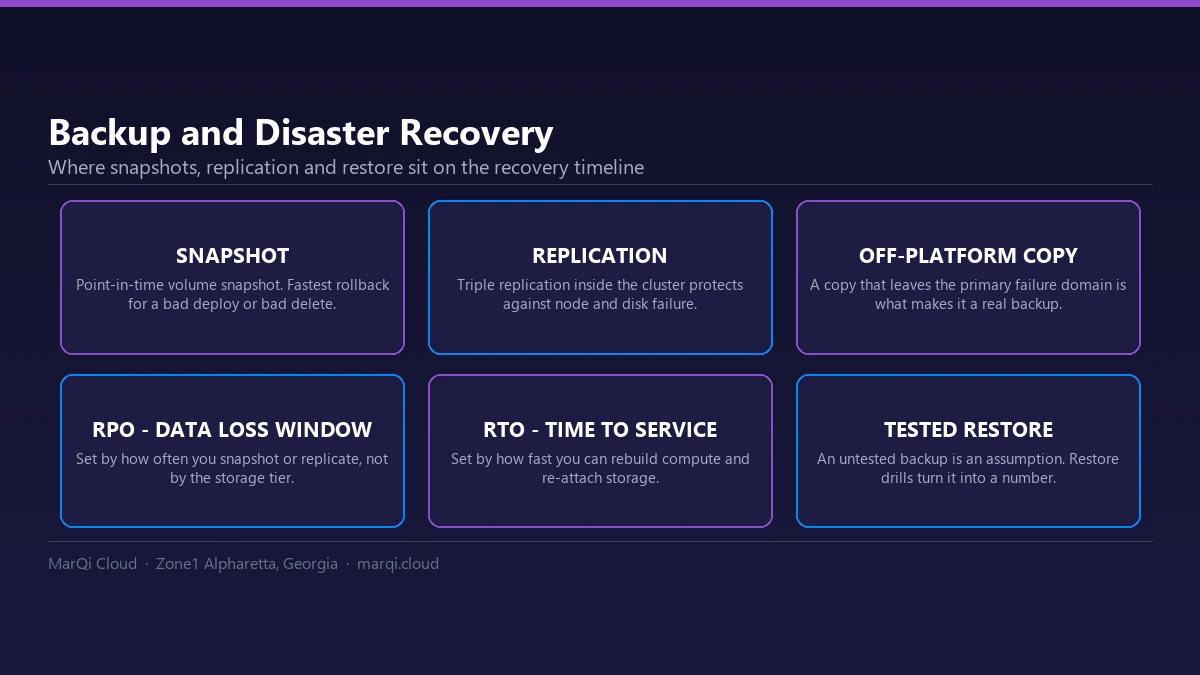
- Recovery Time Objective (RTO): Determining the acceptable downtime for critical systems.
- Recovery Point Objective (RPO): Establishing the maximum tolerable data loss in terms of time.
Snapshots in Hybrid Cloud Disaster Recovery
Snapshots are crucial for data protection in hybrid cloud environments. They capture the state of a virtual machine (VM) or file system at a specific point in time, allowing for quick restoration in case of data loss.
Benefits of Using Snapshots
1. Speed: Snapshots can be created and restored quickly, minimizing downtime.
2. Efficiency: They require less storage space compared to full backups since they only save changes made since the last snapshot.
3. Granularity: Organizations can restore data to any point in time, providing flexibility in recovery processes.
Best Practices for Implementing Snapshots
1. Regular Scheduling: Automate snapshot creation at regular intervals to ensure data is consistently protected.
2. Retention Policies: Establish clear policies on how long snapshots should be retained based on compliance and business needs.
3. Testing Recovery: Regularly test the restoration of snapshots to ensure that they function correctly when needed.
Backups: A Layered Approach
While snapshots provide immediate recovery options, traditional backups are essential for long-term data protection. Backups create a copy of data that can be stored offsite or in the cloud, safeguarding against catastrophic events.
Types of Backups
1. Full Backups: Complete copies of all data. While comprehensive, these can be time-consuming and resource-intensive.
2. Incremental Backups: Only changes made since the last backup are saved, reducing storage requirements and backup times.
3. Differential Backups: These backups capture changes made since the last full backup, providing a middle ground between full and incremental backups.
Implementing Backup Strategies
1. 3-2-1 Backup Rule: Keep three copies of your data, on two different media types, with one copy stored offsite.
2. Encryption: Encrypt backups to protect sensitive data from unauthorized access during storage and transmission.
3. Regular Testing: Regularly test backup restorations to verify data integrity and recovery processes.
High Availability (HA) Solutions
High availability solutions ensure that critical applications remain operational, even during hardware failures or outages. By distributing workloads across multiple servers or data centers, organizations can achieve redundancy and fault tolerance.
High Availability Architectures
1. Active-Active: All nodes are active and can handle traffic, providing load balancing and redundancy.
2. Active-Passive: One node is active while the other is on standby, ready to take over in case of failure.
Implementing HA in Hybrid Cloud
1. Load Balancers: Use load balancers to distribute traffic among multiple servers, ensuring no single point of failure.
2. Geographic Redundancy: Deploy HA solutions across different geographic regions to mitigate the impact of localized disasters.
3. Continuous Monitoring: Implement monitoring tools to detect failures and trigger automated failover processes.
Creating a Comprehensive Disaster Recovery Plan
Developing a disaster recovery plan involves several critical steps:
1. Define Objectives
Clearly outline your RTO and RPO based on business needs and compliance requirements.
2. Identify Critical Assets
Determine which systems, applications, and data are essential for operations and prioritize them in your recovery strategy.
3. Develop Recovery Procedures
Create detailed procedures for restoring systems and data, including roles and responsibilities for team members.
4. Implement Regular Testing
Conduct regular DR drills to test the effectiveness of your plan and make necessary adjustments.
5. Document Everything
Maintain comprehensive documentation of your disaster recovery plan, ensuring it is easily accessible to relevant personnel.
Conclusion
Disaster recovery in hybrid cloud environments is not merely an option; it is a necessity for organizations seeking to protect their data and ensure business continuity. By leveraging snapshots, backups, and high availability solutions, businesses can build a resilient infrastructure capable of withstanding disruptions. A well-structured disaster recovery plan that incorporates these elements will provide peace of mind and the ability to recover swiftly from any incident.
FAQs
1. What is the difference between RTO and RPO?
RTO (Recovery Time Objective) is the maximum acceptable downtime for a system, while RPO (Recovery Point Objective) is the maximum acceptable data loss in terms of time.
2. How often should I take backups?
The frequency of backups depends on your business’s data change rate and compliance needs, but many organizations opt for daily or weekly backups.
3. What is a snapshot in cloud computing?
A snapshot is a point-in-time copy of a virtual machine or data set that allows for quick restoration in the event of data loss.
4. Are snapshots a substitute for backups?
No, snapshots provide immediate recovery options but should not replace regular backups as they may be lost during catastrophic events.
5. What is high availability (HA)?
High availability (HA) refers to systems designed to remain operational and accessible, even during failures or outages.
6. Can I use a hybrid cloud for disaster recovery?
Yes, hybrid clouds can be effectively used for disaster recovery, allowing organizations to leverage both on-premises and cloud resources.
7. How do I test my disaster recovery plan?
Conduct regular DR drills that simulate various failure scenarios to test the effectiveness of your recovery processes.
8. What is the 3-2-1 backup rule?
The 3-2-1 backup rule advises keeping three copies of your data on two different media types, with one copy stored offsite.
9. What tools can help with disaster recovery?
Various tools can assist with disaster recovery, including backup software, monitoring tools, and cloud management platforms.
10. Why is documentation important in disaster recovery planning?
Documentation ensures that all team members understand their roles and responsibilities and provides a clear roadmap for recovery processes.