Multi-Site Connectivity: Encrypted Inter-Zone Links—What to Ask Your Provider
February 21, 2026
Colocation and Cloud Fabric: Keeping Data Gravity Close to Compute
February 21, 2026
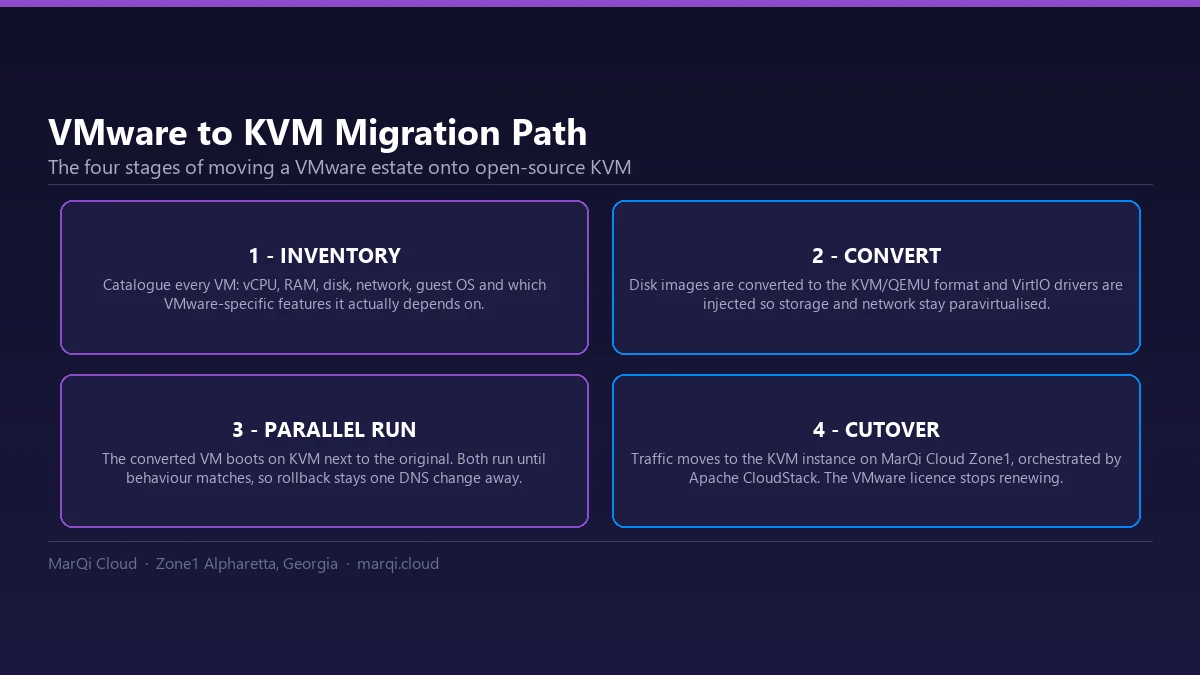
How does a migration to KVM actually work?
Inventory the estate first, then build the target KVM environment, back up the source VMs, convert the disk images to the KVM format, import them, and test before any cutover. The conversion is rarely the hard part - the assessment of what each VM actually depends on is.
Migrating from VMware to KVM: A Step-by-Step Transition Plan
In the ever-evolving landscape of cloud computing, organizations are continually seeking ways to optimize their IT infrastructure. One significant transition that many businesses are considering is migrating from VMware to KVM (Kernel-based Virtual Machine). This shift can provide numerous benefits, including cost savings, improved performance, and enhanced flexibility. In this comprehensive guide, we will outline a step-by-step transition plan to help you navigate the complexities of migrating from VMware to KVM.
What is the difference between VMware and KVM?
What is VMware?
VMware is a leading provider of virtualization solutions that allow businesses to create and manage virtual machines (VMs) on physical servers. It offers a robust suite of products, including vSphere, which is widely used in enterprise environments for its advanced capabilities and user-friendly interface.
What is KVM?
KVM, or Kernel-based Virtual Machine, is an open-source virtualization technology built into the Linux kernel. It allows the Linux kernel to function as a hypervisor, enabling users to run multiple virtual machines on a single physical server. KVM is known for its performance, scalability, and integration with various Linux distributions. The hypervisor side of that is maintained as part of the kernel itself and documented in the kernel KVM documentation.
Benefits of Migrating to KVM
Before diving into the migration process, it’s essential to understand the advantages of transitioning from VMware to KVM:
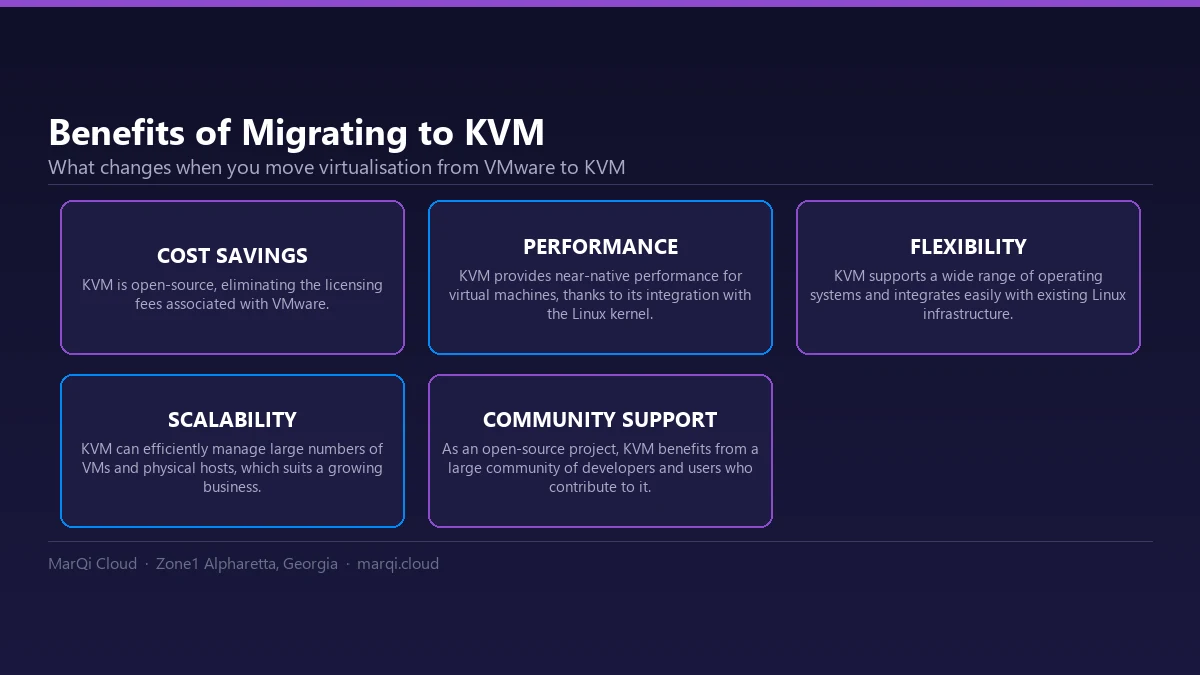
- Cost Savings: KVM is open-source, eliminating licensing fees associated with VMware.
- Performance: KVM provides near-native performance for virtual machines, thanks to its integration with the Linux kernel.
- Flexibility: KVM supports a wide range of operating systems and can be easily integrated with existing Linux infrastructure.
- Scalability: KVM can efficiently manage large numbers of VMs and physical hosts, making it suitable for growing businesses.
- Community Support: As an open-source project, KVM benefits from a large community of developers and users who contribute to its continuous improvement.
Step-by-Step Migration Plan
Step 1: Assess Your Current Environment
The first step in the migration process is to evaluate your existing VMware environment thoroughly. Identify the virtual machines you plan to migrate, their configurations, and any dependencies they may have. Document the following:
- VM specifications (CPU, memory, storage)
- Networking configurations
- Operating systems and applications
- Licensing and compliance requirements
Step 2: Prepare the KVM Environment
Before migrating, you need to set up the KVM environment. This involves:
- Choosing the right Linux distribution that supports KVM (e.g., Ubuntu LTS, Debian, or Rocky Linux).
- Installing KVM and associated tools (like libvirt and virt-manager) on your host machine.
- Configuring storage and networking for your KVM environment, ensuring it aligns with your existing VMware setup.
Step 3: Backup Your VMware VMs
Before initiating the migration, it’s crucial to create backups of all VMware virtual machines. Use VMware’s built-in tools or third-party solutions to ensure that your data is secure and can be restored if needed. The driver libvirt uses to talk to QEMU/KVM, and the options it accepts, are documented in the libvirt QEMU driver guide.
Step 4: Convert VMware VMs to KVM Format
To migrate your VMs, you will need to convert them from VMware’s format to a KVM-compatible format. Tools like qemu-img can facilitate this process. Follow these steps:
- Export the VM from VMware in the OVF or OVA format.
- Use qemu-img to convert the VM to the appropriate format (usually QCOW2 or RAW).
Step 5: Import the Converted VMs into KVM
Once the conversion is complete, you can import the VMs into your KVM environment. Use virsh or virt-manager for this process: The trade-offs between these formats, including how qcow2 handles sparse allocation and snapshots, are set out in the QEMU disk image documentation.
- Use the command-line interface (CLI) or graphical user interface (GUI) to create a new VM based on the imported image.
- Configure the VM settings (CPU, memory, storage) to match the original VMware configuration.
Step 6: Test the Migrated VMs
After importing the VMs, it’s essential to test them thoroughly to ensure they function as expected. Check for:
- Network connectivity
- Application performance
- Data integrity
Address any issues that arise during testing before proceeding with the final migration.
Step 7: Plan the Final Switch
Once you have verified that the migrated VMs are functioning correctly, plan the final switch from VMware to KVM. This could involve:
- Scheduling downtime to minimize disruption.
- Communicating the migration plan to all stakeholders.
- Ensuring that all data is synchronized between the VMware and KVM environments before the final cutover.
Step 8: Execute the Migration
On the scheduled date, execute the migration plan. Ensure that:
- All stakeholders are informed and prepared for the transition.
- Backup procedures are in place in case of unexpected issues.
Step 9: Monitor and Optimize
After the migration is complete, monitor the KVM environment closely. Look for performance anomalies, resource utilization, and user feedback. Use this information to optimize your KVM setup over time.
Step 10: Document the Process
Finally, document the entire migration process, including any challenges faced and how they were resolved. This documentation will be invaluable for future migrations or troubleshooting.
Conclusion
Migrating from VMware to KVM can seem daunting, but with a well-structured plan, it can be a smooth transition that results in significant benefits for your organization. By following the steps outlined in this guide, you can ensure a successful migration that enhances your cloud infrastructure and optimizes your IT resources.
FAQ
1. What are the primary differences between VMware and KVM?
VMware is a proprietary virtualization solution known for its rich feature set, while KVM is an open-source hypervisor integrated into the Linux kernel, offering flexibility and cost savings.
2. Is KVM suitable for enterprise use?
Yes, KVM is widely used in enterprise environments and is capable of handling large-scale virtualization needs.
3. What are the system requirements for running KVM?
A system running KVM should have a compatible CPU with virtualization extensions (Intel VT or AMD-V), sufficient RAM, and storage resources.
4. Can I run Windows VMs on KVM?
Yes, KVM supports a wide range of operating systems, including various versions of Windows.
5. How does KVM compare in terms of performance with VMware?
KVM often provides near-native performance due to its integration with the Linux kernel, making it a competitive alternative to VMware.
6. What tools can I use to manage KVM?
Popular tools for managing KVM include virt-manager, virsh, and OpenStack.
7. Is technical support available for KVM?
While KVM is open-source, many companies offer commercial support for KVM deployments, including consultancy and technical assistance.
8. What are the key considerations before migrating to KVM?
Consider factors such as cost, compatibility with existing applications, required features, and the technical expertise of your team before migrating.
9. How can I ensure data integrity during migration?
Implement robust backup strategies and perform thorough testing of migrated VMs to ensure data integrity throughout the migration process.
10. What should I do if I encounter issues during migration?
Document any issues, consult community forums or professional support, and be prepared to roll back to the VMware environment if necessary.