Cloud Migration Without Downtime: Mastering Blue/Green and Cutover Playbooks
March 2, 2026
Hybrid Kubernetes on VMs and Bare Metal: A Comprehensive US Deployment Blueprint
March 2, 2026
KVM Virtualization Explained: A Practical Alternative to VMware
KVM (Kernel-based Virtual Machine) has emerged as a robust solution in the world of virtualization, offering a practical alternative to established players like VMware. As enterprises increasingly turn to cloud infrastructure for scalability and flexibility, understanding KVM virtualization becomes essential. This article delves into KVM virtualization, comparing it with VMware, and discussing its advantages, use cases, and implementation strategies.
What is KVM Virtualization?
KVM is an open-source virtualization technology integrated into the Linux kernel, transforming the Linux operating system into a hypervisor. This allows users to run multiple virtual machines (VMs) on a single physical server. Each VM has its own operating system, which can be completely different from the host OS, offering flexibility and isolation.
How KVM Works
KVM effectively turns the Linux kernel into a type 1 (bare-metal) hypervisor. It utilizes the Linux kernel’s scheduler, memory management, and process isolation capabilities to manage VMs. Each virtual machine runs as a separate process, with the kernel managing resources like CPU, memory, and I/O devices.
KVM vs. VMware: A Comparison
VMware has long been the go-to solution for virtualization, but KVM presents a compelling alternative. Let’s explore the key differences between the two.
Cost
KVM is open-source and free to use, whereas VMware’s solutions are proprietary and come with licensing fees. For organizations looking to minimize costs, KVM offers a significant advantage.
Performance
Both KVM and VMware deliver high performance, but KVM benefits from close integration with the Linux kernel, resulting in lower overhead and improved efficiency in many cases.
Flexibility and Compatibility
KVM supports a wide range of operating systems, including various Linux distributions and Windows versions. VMware, while versatile, is typically more limited in terms of supported guest operating systems.
Management Tools
VMware offers a suite of robust management tools, such as vSphere, which can simplify the administration of virtual environments. KVM, however, can be managed through various tools like oVirt, Proxmox, or even command-line interfaces, providing flexibility in management approaches.
Advantages of KVM Virtualization
There are several compelling reasons to choose KVM virtualization over VMware:
1. Open Source and Community Support
KVM’s open-source nature means that users can access the source code, modify it, and contribute to its development. This results in a vibrant community that supports users and drives innovation.
2. Scalability
KVM is designed to scale efficiently, handling large numbers of VMs on a single host without significant performance degradation. This scalability is crucial for enterprises with growing workloads.
3. Security
With KVM, security is enhanced through isolation of VMs and the use of Linux’s security features. Additionally, KVM is regularly updated to address vulnerabilities, ensuring a secure virtualization environment.
4. Integration with Existing Infrastructure
For organizations already using Linux servers, KVM can be easily integrated into existing infrastructure, reducing complexity and improving efficiency.
5. Performance
KVM delivers excellent performance, leveraging the host’s hardware directly, which often results in better I/O performance compared to VMware.
Use Cases for KVM Virtualization
KVM is suitable for a variety of applications and environments:
1. Cloud Computing
Many cloud service providers use KVM to offer Infrastructure as a Service (IaaS) solutions, benefiting from its scalability and performance.
2. Development and Testing
Developers can create isolated environments for testing applications across different configurations without the need for multiple physical machines.
3. Virtual Desktop Infrastructure (VDI)
KVM can be an effective solution for deploying VDI, allowing organizations to provide desktop environments to users on-demand.
4. Disaster Recovery
KVM’s capabilities make it suitable for disaster recovery solutions, enabling organizations to replicate virtual machines and recover quickly from failures.
Implementing KVM Virtualization
Implementing KVM in your infrastructure involves several steps:
1. System Requirements
Ensure that your hardware supports virtualization (Intel VT or AMD-V). Most modern processors do, but it’s essential to verify.
2. Installation
KVM can be installed on most Linux distributions. Tools like Virt-Manager can simplify the installation process and provide a GUI for managing VMs.
3. Configuration
After installation, configure networking, storage, and VM settings as per your organizational needs. This can be done through command-line tools or graphical interfaces.
4. Management
Utilize management tools to monitor performance, allocate resources, and automate VM operations. Regular updates and maintenance are also crucial for performance and security.
Conclusion
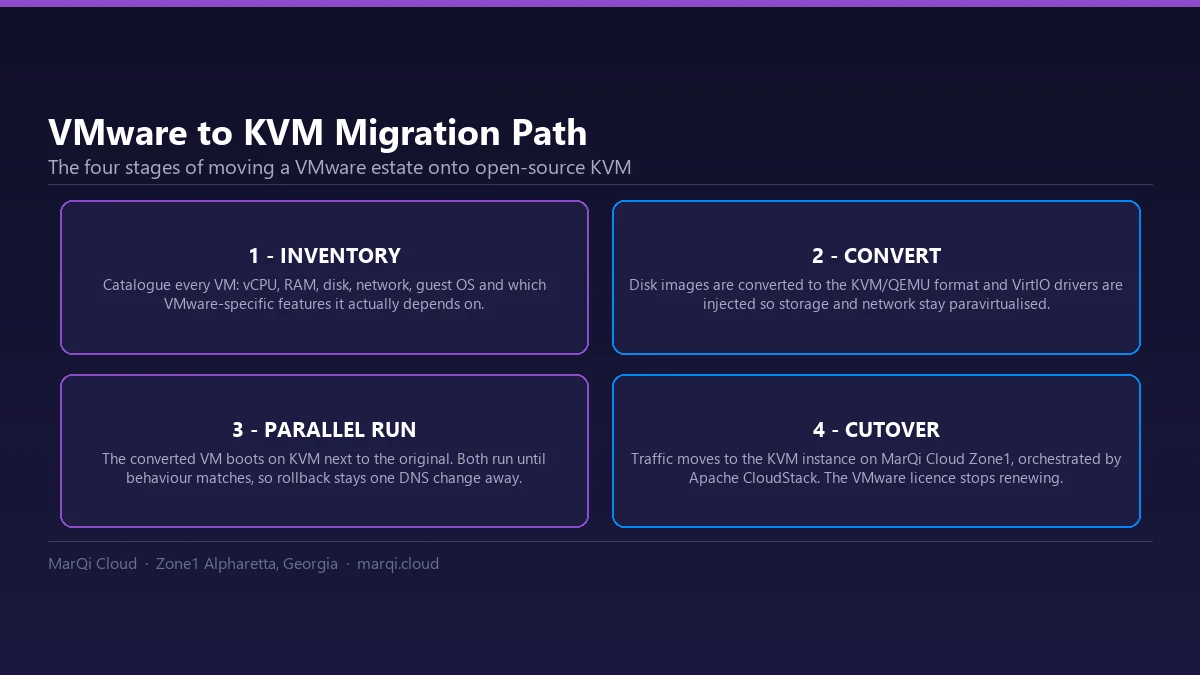
KVM virtualization stands out as a practical and cost-effective alternative to VMware, offering robust features, flexibility, and strong community support. As enterprises continue to embrace cloud solutions, KVM provides an excellent foundation for scalable and secure virtualization. By understanding its capabilities and implementation strategies, organizations can leverage KVM to enhance their infrastructure, reduce costs, and improve operational efficiency. If you are moving existing workloads, see our plan for migrating from VMware to KVM.
FAQs
1. What is KVM virtualization?
KVM virtualization is an open-source technology that turns the Linux kernel into a hypervisor, allowing multiple virtual machines to run on a single physical server.
2. How does KVM compare to VMware?
KVM is open-source and free, while VMware is proprietary and comes with licensing costs. KVM also integrates closely with the Linux kernel, potentially offering better performance.
3. What are the advantages of using KVM?
Advantages include open-source flexibility, scalability, security, performance, and easy integration with existing Linux infrastructure.
4. Can KVM run Windows virtual machines?
Yes, KVM can run various operating systems, including Windows, as guest operating systems on virtual machines.
5. What tools can be used to manage KVM?
Management tools like oVirt, Proxmox, and Virt-Manager can be used to manage KVM environments effectively.
6. Is KVM suitable for cloud computing?
Yes, KVM is widely used in cloud computing environments due to its scalability and performance capabilities.
7. How can I implement KVM in my infrastructure?
Implementing KVM involves ensuring hardware compatibility, installing KVM on a Linux distribution, configuring networking and storage, and using management tools for administration.
8. What are the security features of KVM?
KVM benefits from the security features of the Linux kernel, providing VM isolation and regular updates to address vulnerabilities.
9. Can KVM be used for disaster recovery?
Yes, KVM can be an effective solution for disaster recovery, allowing organizations to replicate VMs and recover quickly from failures.
10. How does KVM handle performance?
KVM leverages the host’s hardware directly, resulting in high performance and lower overhead compared to some other virtualization solutions.